True/False
Indicate whether the
statement is true or false.
|
|
|
1.
|
The power supply generates electricity in a voltage that the computer can
handle.
|
|
|
2.
|
All devices in a computer are either installed directly on the system board,
directly linked with a cable or indirectly linked through an expansion card.
|
|
|
3.
|
The current trend is to keep most motherboard setup information in jumpers and
switches.
|
|
|
4.
|
A SIMM with a rating of 60 ns is faster than a SIMM with a rating of 80
ns.
|
|
|
5.
|
Viruses help your computer.
|
|
|
6.
|
Backing up data is time-consuming and unneccessary.
|
|
|
7.
|
Punching your monitor when you are frustrated is a good way to take out your
anger.
|
|
|
8.
|
Do not put things into your computers fan.
|
|
|
9.
|
Price is the most important consideration when selecting a system board.
|
|
|
10.
|
It is not possible to dual boot between Mac OS X and Windows XP.
|
Multiple Choice
Identify the
choice that best completes the statement or answers the question.
|
|
|
11.
|
This operating system was the basis for Linux.
a. | Windows 95 | b. | Windows NT | c. | Windows
2000 | d. | UNIX |
|
|
|
12.
|
The ____ slot is typically used for high-speed input/output devices.
|
|
|
13.
|
Krakatoa V. Cano has an older motherboard and has a newer video card. He read
that the video card will be supported with a BIOS upgrade. His friend has a different motherboard and
has a FLASH program. Krakatoa borrows the flash program from his friend and attempts to flash his
BIOS.
What will be the probable outcome.
a. | The new BIOS software will be written to the ROM chip and the motherboard will now
support the video card. | c. | The motherboard will be rendered useless. | b. | The new BIOS
software will be written to the ROM chip but it won’t support the new video card. However it
should still work. | d. | The
flash program won’t work. |
|
|
|
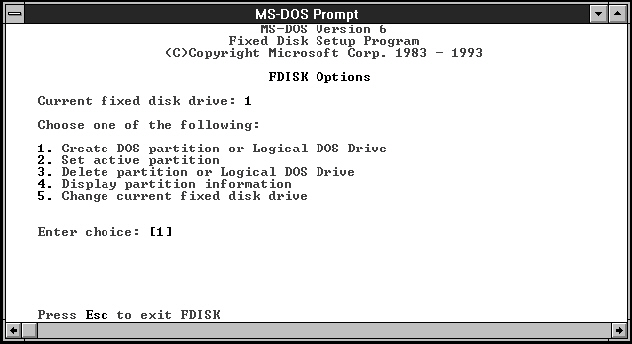 Image 7
|
|
|
14.
|
In Image 7 you can use this DOS based program to do what?
a. | Format a hard drive | c. | Create and delete partitions | b. | Delete a hard
drive | d. | Gather information
about tracks and sectors |
|
|
|
15.
|
|
|
|
16.
|
A plug and play BIOS chip can set what resources?
a. | IRQs | c. | Upper memory addresses | b. | DMAs | d. | Any of these |
|
|
|
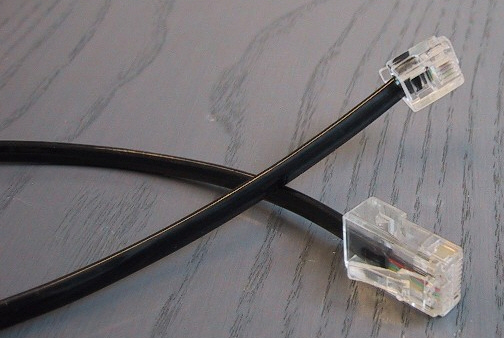 Image 1-3
|
|
|
17.
|
The connector in image 1-3 is a:
a. | RJ45 connector | c. | Serial connector | b. | RJ11 connector | d. | Parallel
connector |
|
|
|
 Image 1-12
|
|
|
18.
|
The port in image 1-12 is a:
a. | Serial | c. | 1394 | b. | VGA | d. | Parallel |
|
|
|
19.
|
Which of the following is NOT true about the BTX motherboard form
factor?
a. | It uses in-line airflow | c. | There are currently three
styles | b. | It is compatible with the ATX form factor | d. | It provides such technologies as USB, PCIe, and
SATA |
|
|
|
20.
|
You buy a new computer without a floppy drive. You still do some support on
stations that require floppies, so you install one on your own. When you start your computer up for
the first time afterwards, the floppy light comes on and stays on and the drive won’t read
floppies. What might be the problem?
a. | The molex connector is not tight. | c. | You did not connect the drive to
the motherboard | b. | The ribbon cable is backwards | d. | You did not connect the drive to the CD
ROM |
|
Multiple Response
Identify one
or more choices that best complete the statement or answer the question.
|
|
|
21.
|
If you were upgrading from Windows 9x to Windows NT and you had a piece of
hardware that didn’t work with NT, what are your options? Choose all that apply.
|
|
|
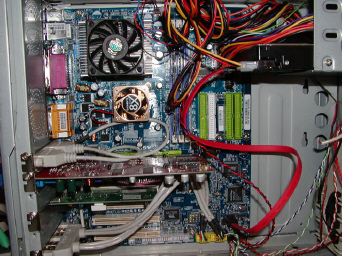 Image 6
|
|
|
22.
|
In Image 6 the type of hard drive used provides for:
|
|
|
23.
|
Why learn DOS?
|
|
|
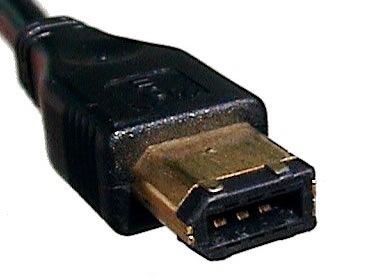 Image 1-1
|
|
|
24.
|
What kind of connector is shown in exhibit 1-1? Select all that
apply.
|
|
|
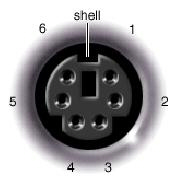 Image 1-10
|
|
|
25.
|
In image 1-10 you are looking at (select all that apply).
|
|
|
26.
|
You suspect a malicious user is trying to gain access to your computer via the
network. What two things can you do to track this activity?
|
|
|
27.
|
Your friend is asking about overclocking his CPU. What should you tell him about
overclocking?
|
|
|
28.
|
You work for a very large company. Your supervisor requires you document
everything you do with all hardware. Which of the following would be the most likely reason for this
policy?
|
|
|
29.
|
What steps can you take to reduce the changes of ESD?
|
|
|
30.
|
Which of the following would be integral tools for a technician’s
toolkit?
|
Completion
Complete each
statement.
|
|
|
31.
|
The ____ is the first software the loads when you start the computer. It
contains information for what is installed on the computer.
|
|
|
32.
|
A set instructions that directs hardware to perform a task.
|
|
|
33.
|
On state
|
|
|
34.
|
A __ is a pathway of communication that includes the protocol and the method of
communication.
|
|
|
35.
|
The ____________________ command displays the directory structure of a hard
drive or disk.
|
|
|
36.
|
This RAM needs constant refreshing in order to maintain the integrity of its
data.
|
|
|
37.
|
On a disk surface, one segment of a track, which almost always contains 512
bytes of data. Sometimes a single wedge of the disk surface is also called a ____.
|
|
|
38.
|
In a 16 bit BUS, __ bits of data can be transferred at a time.
|
|
|
39.
|
____ mastering is a card with its own processor. This allows it to run
completely separate from the CPU, meaning it can run faster.
|
|
|
40.
|
Firewire can support up to __ devices on one port.
|
Matching
|
|
|
Match the following to the kind of RAM or ROM. Answers will be used more than
once. a. | SRAM | c. | Flash memory | b. | DRAM |
|
|
|
41.
|
Can be used to speed of the processing of the CPU
|
|
|
42.
|
Made up of transisitors that hold a charge
|
|
|
43.
|
Refreshed every 4 milliseconds or so
|
|
|
Match the DOS command to its function. Some answers may be used more than
once.
a. | MEM | g. | HIMEM.SYS | b. | DEVICEHIGH | h. | 0-640KB | c. | LOADHIGH | i. | 640KB-1024KB | d. | DOS=HIGH | j. | Above 1024KB | e. | DOS=UMB | k. | First 64KB of Extended Memory | f. | EMM386.exe |
|
|
|
44.
|
A driver that allows DOS to have access to memory over 640KB
|
|
|
45.
|
Extended memory
|
|
|
46.
|
Upper memory
|
|
|
Match the port to its description. 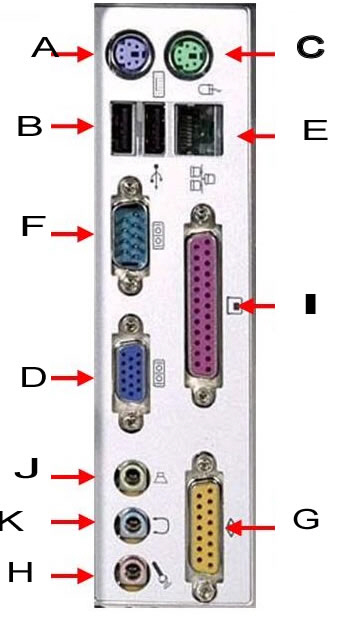
|
|
|
47.
|
speakers/line out
|
|
|
48.
|
network
|
|
|
49.
|
serial
|
|
|
50.
|
game port
|