True/False
Indicate whether the
statement is true or false.
|
|
|
1.
|
The power supply generates electricity in a voltage that the computer can
handle.
|
|
|
2.
|
All programs must be copied from secondary storage into RAM before the CPU can
process them.
|
|
|
3.
|
All devices in a computer are either installed directly on the system board,
directly linked with a cable or indirectly linked through an expansion card.
|
|
|
4.
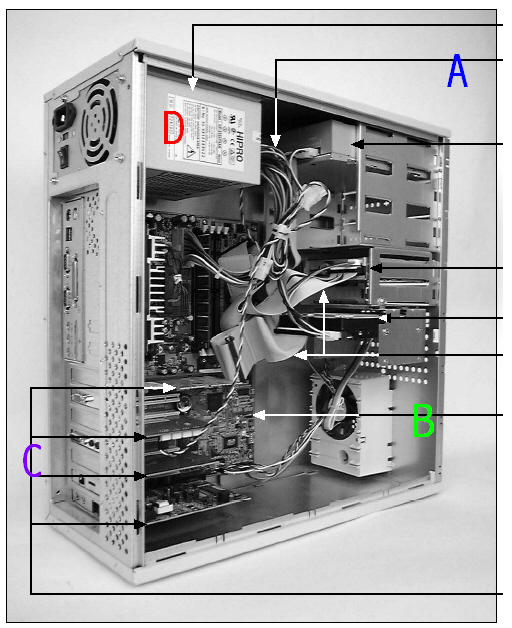
|
Permanent storage is temporary.
|
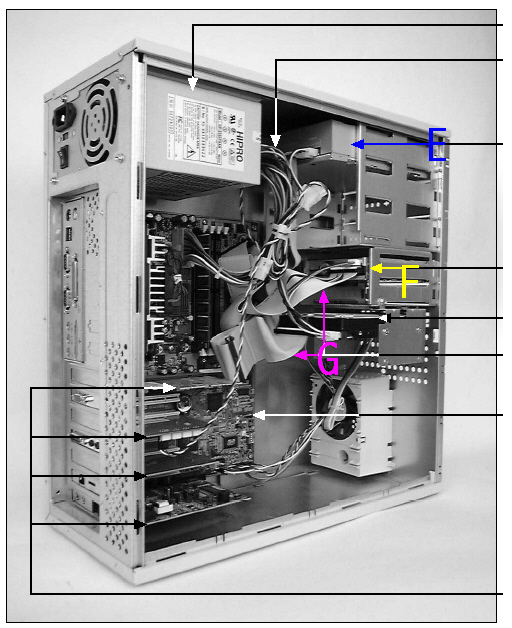
|
|
5.
|
The primary partition can have only a single logical drive, and is the only
partition on the hard drive that can boot the operating system.
|
|
|
6.
|
Memory is managed the same in Windows 9x as it is in DOS.
|
|
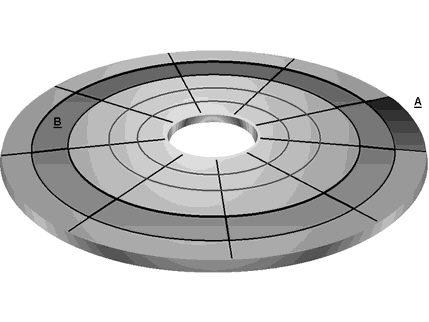
|
7.
|
The purpose of an emergency repair disk is to be able to boot the computer and
fix it when Windows doesn’t work.
|
|
|
8.
|
The current trend is to keep most motherboard setup information in jumpers and
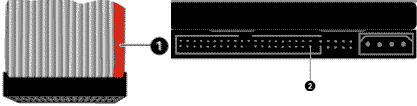
switches.
|
|
|
9.
|
A SIMM with a rating of 60 ns is faster than a SIMM with a rating of 80
ns.
|
|
|
10.
|
Memory is managed the same in Windows 9x as it is in DOS.
|
|
|
11.
|
Equipment may not be installed and/or removed on any campus computer except by
the Net Tech Team
|
|
|
12.
|
Viruses help your computer.
|
|
|
13.
|
Backing up data is time-consuming and unneccessary.
|
|
|
14.
|
Be Respectful
|
|
|
15.
|
You don’t have to listen to anything Tory tells you to do.
|
|
|
16.
|
The best way to take tools back to your area is to run with them, especially if
they are pointy.
|
|
|
17.
|
Always make sure the person next to you is as uncomfortable as possible.
|
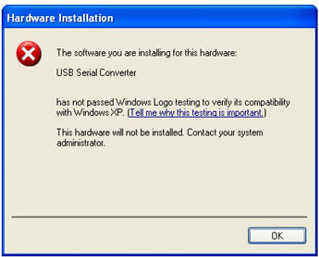
|
|
18.
|
Punching your monitor when you are frustrated is a good way to take out your
anger.
|
|
|
19.
|
Always make sure that your computer is unplugged before you open up the
case.
|
|
|
20.
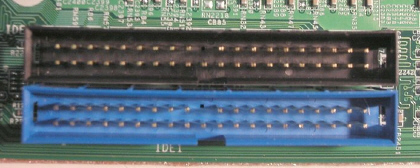
|
Do not put things into your computers fan.
|
|
|
21.
|
If you purchase a system board with embedded components, you should be sure that
you can disable the embedded devices, if needed.
|
|
|
22.
|
Price is the most important consideration when selecting a system board.
|
|
|
23.
|
ESCD Plug-and-Play BIOS is written to a special RAM chip called Permanent RAM,
which uses a battery to retain data when the system is powered down.
|
|
|
24.
|
Most of today's new devices are not supported by the system BIOS, but by
device drivers.
|
|
|
25.
|
DRAM SIMMs rapidly lose their data and must be refreshed every 3.86
milliseconds.
|
|
|
26.
|
The AGP bus has a direct connection to the CPU without having to use the slower
PCI bus.
|
|
|
27.
|
It is not possible to dual boot between Mac OS X and Windows XP.
|
Multiple Choice
Identify the
choice that best completes the statement or answers the question.
|
|
|
28.
|
 C is referring to: a. | Expansion cards | b. | Power supply | c. | Power
cables | d. | Mother board |
|
|
|
29.
|
Merry has a need to be able to open more than one program at a time. It is not
imperative that her computer be able to do true multitasking, but she must at least be able to
perform task switching.
Which operating system would she choose that would meet her minimum
requirements without giving her too much power.
a. | DOS | b. | Windows 3.x | c. | Windows
1.x | d. | UNIX |
|
|
|
30.
|
Kami brings you a cable that looks like the accompanying picture. She asks you
to identify it. You tell her it is:  a. | A cable for a keyboard | b. | A cable for a mouse | c. | A cable for a
computer monitor | d. | A cable for a printer |
|
|
|
31.
|
 E refers to: a. | CD ROM | b. | IDE Ribbon cables | c. | Hard
drive | d. | Floppy drive |
|
|
|
32.
|
This component is responsible for maintaining the timing of the computer and its
processes.
a. | System clock | b. | Real time clock | c. | Central Processing
Unit | d. | System timer |
|
|
|
33.
|
This was the first operating system to support plug and play. (It was available
in S/R 2.)
a. | Windows NT | b. | Windows 98 | c. | Windows 95
| d. | Windows 3.3 |
|
|
|
34.
|
This operating system was the basis for Linux.
a. | Windows 95 | b. | Windows NT | c. | Windows
2000 | d. | UNIX |
|
|
|
35.
|
A ____ is the smallest unit of display on a monitor.
a. | character | b. | pixel | c. | phosphor | d. | dot pitch |
|
|
|
36.
|
The ____ is the most complicated piece of equipment inside the case.
a. | floppy drive | b. | system board | c. | CD-ROM | d. | video card |
|
|
|
37.
|
The ____ supports the CPU by controlling many system board activities.
a. | EPROM | b. | CMOS | c. | RAM | d. | chip set |
|
|
|
38.
|
The ____ ensures that all activities are performed in a synchronized
fashion.
a. | system bus | b. | system clock | c. | real time
clock | d. | CPU |
|
|
|
39.
|
The ____ slot is typically used for high-speed input/output devices.
|
|
|
40.
|
Data and instructions are stored on the system board in special chips called
____.
a. | the system clock | b. | ROM | c. | RAM | d. | RIMM |
|
|
|
41.
|
Krakatoa V. Cano has an older motherboard and has a newer video card. He read
that the video card will be supported with a BIOS upgrade. His friend has a different motherboard and
has a FLASH program. Krakatoa borrows the flash program from his friend and attempts to flash his
BIOS.
What will be the probable outcome.
a. | The new BIOS software will be written to the ROM chip and the motherboard will now
support the video card. | c. | The motherboard will be rendered useless. | b. | The new BIOS
software will be written to the ROM chip but it won’t support the new video card. However it
should still work. | d. | The
flash program won’t work. |
|
|
|
42.
|
This is a newer expansion port that is faster, stronger, and meatier than other
ports. Among other features, two cards can communicate between ports allowing the cards to share a
single job (i.e. two video cards working together to render faster).
a. | PCI | c. | ISA Express | b. | ISA | d. | PCI Express |
|
|
|
43.
|
Which of the following is NOT a method you would use to connect a printer to a
computer.
a. | Network | d. | Firewire | b. | Parallel cable | e. | You can use any of these methods to connect to
a printer | c. | USB |
|
|
|
44.
|
In a process called ____, track and sector markings are written on the hard
drive at the factory.
a. | high-level formatting | b. | low level formatting | c. | partitioning | d. | parking |
|
|
|
 Figure
6–4 Figure
6–4
|
|
|
45.
|
In Figure 6-4, Item A is next to a darker segment of the graphic, representing a
____.
a. | cylinder | b. | segment | c. | track | d. | sector |
|
|
|
46.
|
In Figure 6-4, Item B is next to a darker concentric circle, representing a
____.
a. | FAT | b. | segment | c. | track | d. | sector |
|
|
|
47.
|
The OS considers an IDE drive to be a very long list of logical sectors, each
____ bytes long.
|
|
|
48.
|
SCSI devices interface with the ____ rather than the CPU.
a. | DMA | b. | host adapter | c. | IRQ
controller | d. | system clock |
|
|
|
49.
|
A SCSI requires termination to reduce 'noise' or interference.
Termination should occur ____.
a. | at the host adapter end of the bus | b. | at the last device on the
bus | c. | at the host adapter and device 0 | d. | at both ends of the
bus |
|
|
|
50.
|
What step in the process of preparing a disk for use lays out the tracks and
sectors on the drive?
a. | low level format | b. | configure jumpers | c. | partition | d. | high level
format |
|
|
|
51.
|
At the very beginning of the drive (head 0, track 0, sector 1) is stored the
____, which contains information about the logical partitions on the drive.
a. | FAT | b. | MBR | c. | partition
table | d. | root directory |
|
|
|
52.
|
When the drive is partitioned, ____ assigns a drive letter to each logical
drive.
a. | FORMAT | b. | SYS | c. | MEM | d. | FDISK |
|
|
|
53.
|
To display or change file attributes use the ____ command.
a. | SET | b. | DIR /AT | c. | ATTRIB | d. | DISP |
|
|
|
54.
|
When the clusters making up a file are not contiguous, or next to each other,
the file is said to be ____.
a. | scattered | b. | distributed | c. | fragmented | d. | disbursed |
|
|
|
55.
|
Use ____ to rearrange the files on a hard drive so that they are
contiguous.
a. | DEFRAG | b. | ORDER | c. | ATTRIB | d. | CHKDSK |
|
|
|
 Img2
|
|
|
56.
|
In Img2 the number 1 refers to:
a. | Pin one on the hard drive | c. | Pin one on the IDE
cable | b. | Pin one on the SATA cable | d. | The key for coordinating how the cable plugs in |
|
|
|
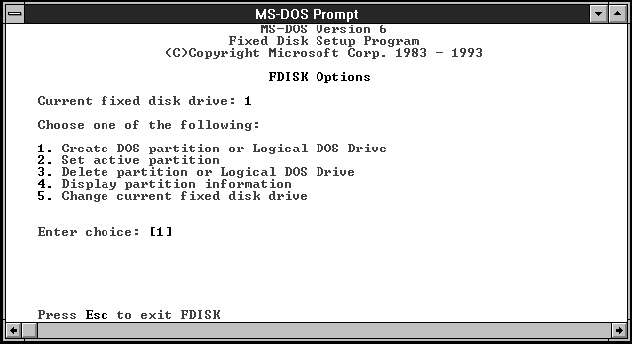 Image 7
|
|
|
57.
|
In Image 7 you can use this DOS based program to do what?
a. | Format a hard drive | c. | Create and delete partitions | b. | Delete a hard
drive | d. | Gather information
about tracks and sectors |
|
|
|
58.
|
To rename a file from lion to bear, what command would you type? (Assume lion is
in your root drive c:\)
a. | ren c:\lion bear | c. | move c:\lion bear | b. | ren c:\bear lion | d. | move c:\bear
lion |
|
|
|
59.
|
This is a utility that can, among other things, benchmark your hard drive and
compare it to other drives.
a. | SANDRA | c. | DriveSPC | b. | Doublespace | d. | FDISK |
|
|
|
60.
|
This speeds up the writing of the tracks that are closer to the center of the
drive:
a. | compensation | c. | zone bit recording | b. | encapsulization | d. | precompensation |
|
|
|
61.
|
This formatting lays down the boot sector, FAT, and root directory.
a. | DOS | c. | High level | b. | Low level | d. | Boot sector |
|
|
|
62.
|
This can be changed by applying an ultraviolet light to it, but is otherwise
known as ROM.
a. | EPROM | c. | EEPROM | b. | ROM | d. | PROM |
|
|
|
63.
|
|
|
|
64.
|
This determines how many memory addresses are available:
a. | The number of address entries in the vector table | c. | The operating
system | b. | The number of address lines on the memory bus | d. | The size of RAM |
|
|
|
65.
|
Yrot has two hard drives on her system but only a little RAM. What is one way to
speed up the computer?
a. | Make sure the swap file is big. | c. | Move the swap file to the drive
that does not hold the OS | b. | Make sure the swap file is on the same drive as
the OS | d. | Make sure the swap
file is small so it doesn’t take up much drive space |
|
|
|
66.
|
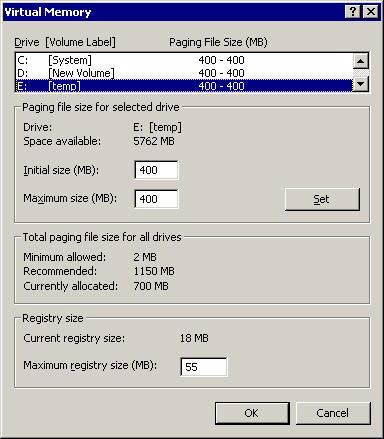 In the picture above, the maximum size of the
pagefile is? a. | 500KB | c. | 55MB | b. | 500MB | d. | 55KB |
|
|
|
67.
|
This command allows you to copy the entire contents of a disk with one
command.
a. | extract.ext | c. | copy | b. | diskcopy | d. | copy /all |
|
|
|
68.
|
A cabinet file is...
a. | like a zip file, only it can be extracted using Windows or DOS and the unzip
command | c. | like a zip file, only it can be extracted using Windows or DOS and the extract
command | b. | a file with other files stored inside of it, like a folder | d. | a folder |
|
|
|
69.
|
In a process known as ____, a floppy disk is mapped into tracks and
sectors.
a. | partitioning | b. | registering | c. | formatting | d. | mapping |
|
|
|
70.
|
The DOS command FORMAT A: /S ____.
a. | prepares the disk in the A: drive use | b. | formats the subdirectories on the disk in drive
A: | c. | displays the format of the disk in drive A: | d. | prepares the disk in
the A: drive use and then copies the OS to it |
|
|
|
71.
|
The DOS command that deletes files is ____.
a. | REMOVE | b. | KILL | c. | DEL | d. | UNDELETE /LIST |
|
|
|
|
|
|
72.
|
This cable is for a:
a. | IDE hard drive | c. | Floppy drive | b. | SATA hard drive | d. | CD Drive |
|
|
|
73.
|
____ are used to pass data back and forth between a hardware device and
memory.
a. | DMA channels | b. | IRQ's | c. | I/O
addresses | d. | Memory addresses |
|
|
|
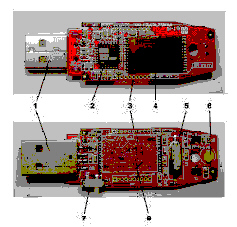 Figure 5-5
|
|
|
74.
|
In figure 5-5, you are looking at:
a. | EEPROM | c. | SD Card | b. | Flash Memory | d. | SRAM |
|
|
|
 5-6
|
|
|
75.
|
In figure 5-6, you are looking at:
a. | EEPROM | c. | SD Card | b. | Flash Memory | d. | SRAM |
|
|
|
76.
|
Where should you start in the following situation?
The computer will not
start up when the power button is pressed. The monitor does have power when you turn it on.
a. | Keyboard and Mouse PS/2 Connection | c. | Power Cord
Connection | b. | Monitor Connection | d. | Internal Hardware Wiring |
|
|
|
77.
|
Which of the following can give you viruses, spyware, or malware?
a. | websites | b. | Emails from friends | c. | Pop-Ups | d. | All of the
Above |
|
|
|
78.
|
When opening a computer, remember to use the ground(ing) ___________
a. | equipment | b. | pole | c. | hog | d. | All of the
above |
|
|
|
79.
|
Before you leave after a job is done ask if there are any other ___________ or
__________ that they may be having
a. | Problems, questions | b. | food, drink | c. | game,
parties | d. | blank, blank |
|
|
|
80.
|
ATX-type system board power connectors are ____.
a. | a single 20-pin connector, labeled P8 | b. | two 12-pin connectors, labeled P8 and
P9 | c. | two 12-pin connectors, labeled P1 and P2 | d. | a single 20-pin
connector, labeled P1 |
|
|
|
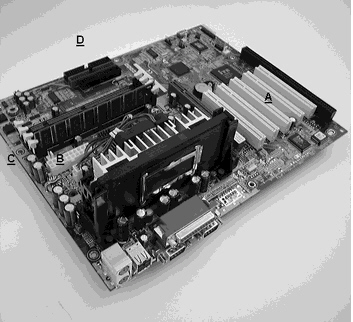 Figure
3–3 Figure
3–3
|
|
|
81.
|
In Figure 3-3, Item A is the ____.
a. | system board connections for IDE and floppy drives | b. | DIMM
slots | c. | P1 power connection on the system board | d. | PCI local bus
slots |
|
|
|
82.
|
In Figure 3-3, Item C is the ____.
a. | system board connections for IDE and floppy drives | b. | DIMM
slots | c. | P1 power connection on the system board | d. | PCI local bus
slots |
|
|
|
83.
|
A Pentium CPU is said to have multi-processing capabilities because it contains
____ ALUs.
|
|
|
84.
|
The bus between a Pentium Pro processor and the L2 cache is known as the cache
bus or ____.
a. | back side bus | b. | front side bus | c. | internal
bus | d. | external bus |
|
|
|
85.
|
The front side bus connects the CPU to the ____.
a. | system clock | b. | L1 cache | c. | coprocessor | d. | memory bus |
|
|
|
86.
|
ZIF Socket 5 connectors use a ____ configuration to squeeze more pins into a
small space.
|
|
|
87.
|
The common name for EEPROM chips is ____.
a. | ALU | b. | CPU | c. | cache
ROM | d. | Flash ROM |
|
|
|
88.
|
The two types of RAM are ____, which hold data for a very short period of time,
and ____, which holds data until the power is turned off.
a. | PRAM, DRAM | b. | SRAM, DRAM | c. | DRAM,
SRAM | d. | SRAM, PRAM |
|
|
|
89.
|
The PCI bus runs at ____ the speed of the system bus.
a. | 1/4 | b. | 1/2 | c. | double | d. | four times |
|
|
|
90.
|
The ____ bus runs at the same speed as the system bus.
|
|
|
91.
|
a. | NLX form factor | c. | Micro ATX form factor | b. | AT form
factor | d. | Flex ATX form
factor |
|
|
|
92.
|
This is a small amount of really fast RAM that statically holds programming code
for the CPU.
a. | SDRAM | c. | Memory cache | b. | DDRAM | d. | DIMM |
|
|
|
93.
|
a. | SDRAM | c. | Memory cache | b. | DDRAM | d. | DIMM |
|
|
|
94.
|
A plug and play BIOS chip can set what resources?
a. | IRQs | c. | Upper memory addresses | b. | DMAs | d. | Any of these |
|
|
|
95.
|
DRAM
a. | Holds a charge longer | c. | Is faster | b. | Holds a charge for only 3.86
milliseconds | d. | Is more
expensive |
|
|
|
96.
|
A customer has called you asking for help setting up his iTunes. What should you
avoid?
a. | Telling the customer that this is of little value and he shouldn’t be using it
at work anyhow | c. | Trying a quick fix | b. | Go to the customer and help him set up his
Outlook | d. | Telling the user
that you will research the problem and get back to them ASAP. |
|
|
|
97.
|
What kind of RAM modules do laptops take?
a. | DDR SDRAM SODIMM | c. | DDR SDRAM DIMM | b. | SGRAM | d. | DDR2 SDRAM SIMM |
|
|
|
98.
|
A customer calls and would like help with backing up data daily. The company is
open seven days a week with two full day and night shifts. A full backup would take about 10 hours.
Which backup scheme would you suggest?
a. | A full backup every night | c. | A full backup on Sunday and an
incremental backup Monday-Saturday | b. | A full backup on Sunday and a daily copy backup
Monday-Saturday | d. | A full
backup on Sunday and a differential backup on Monday-Saturday |
|
|
|
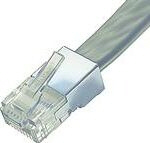 Image 1-2
|
|
|
99.
|
The connector in image 1-2 is a:
a. | Standard network connector | c. | Serial
connector | b. | Standard telephone connector | d. | Parallel
connector |
|
|
|
100.
|
The connector in image 1-2 is a:
a. | RJ45 connector | c. | Serial connector | b. | Standard telephone
connector | d. | Parallel
connector |
|
|
|
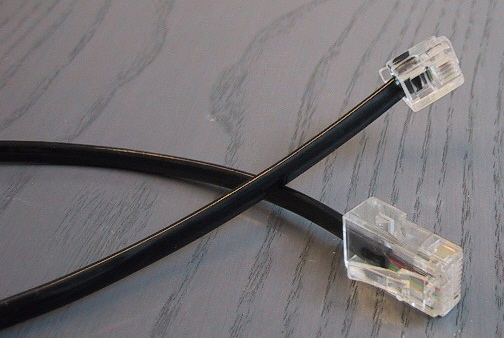 Image 1-3
|
|
|
101.
|
The connector in image 1-3 is a:
a. | RJ45 connector | c. | Serial connector | b. | Standard telephone
connector | d. | Parallel
connector |
|
|
|
102.
|
The connector in image 1-3 is a:
a. | RJ45 connector | c. | Serial connector | b. | RJ11 connector | d. | Parallel
connector |
|
|
|
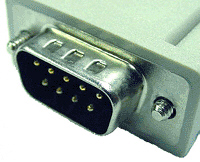 Image 1-4
|
|
|
103.
|
The connector in image 1-4 is a:
a. | RJ45 connector | c. | Serial connector | b. | RJ11 connector | d. | Parallel
connector |
|
|
|
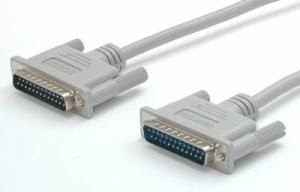 Image 1-5
|
|
|
104.
|
The connector in image 1-5 is a:
a. | RJ45 connector | c. | Serial connector | b. | RJ11 connector | d. | Parallel
connector |
|
|
|
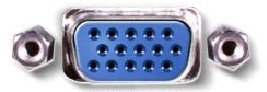 Image 1-6
|
|
|
105.
|
The connector in image 1-6 is a:
a. | Serial connector | c. | 1284 connector | b. | VGA connector | d. | Parallel
connector |
|
|
|
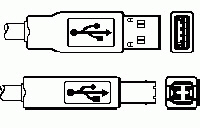 Image 1-7
|
|
|
106.
|
The connector in image 1-7 is a:
a. | Serial connector | c. | USB connector | b. | VGA connector | d. | 1284 connector |
|
|
|
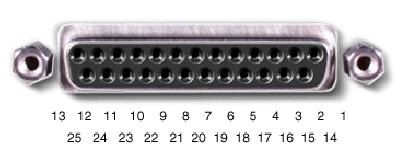 Image 1-11
|
|
|
107.
|
The connector in image 1-11 is a:
a. | RJ45 connector | c. | Serial connector | b. | RJ11 connector | d. | Parallel
connector |
|
|
|
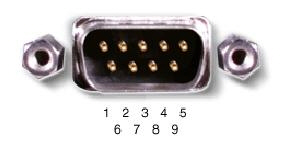 Image 1-12
|
|
|
108.
|
The port in image 1-12 is a:
a. | Serial | c. | 1394 | b. | VGA | d. | Parallel |
|
|
|
109.
|
A user has heard that there are great benefits of using NTFS over FAT. He
currently has his drive formatted FAT32, but would like to have it NTFS. What would be the
best course of action you could advise.
a. | Back up all the data and reformat the drive in NTFS | c. | Go to the command prompt type
convert c: /fs:ntfs | b. | Don’t use NTFS because FAT32 security is
better | d. | Right click on my
computer and select manage. Open disk management. Left click on the partition and select
“Change file system.” |
|
|
|
110.
|
Which of the following is NOT true about the BTX motherboard form
factor?
a. | It uses in-line airflow | c. | There are currently three
styles | b. | It is compatible with the ATX form factor | d. | It provides such technologies as USB, PCIe, and
SATA |
|
|
|
111.
|
Your grandma just got her first computer. She calls you with a complaint. She
said it used to be really fast, but now she has to wait several seconds for a response when she
clicks on an icon. She says it’s particularly bad when she does on the Internet. You take a
look and notice she’s installed a lot of free utilities from the Internet such as Weatherbug,
stock quotes, etc. What do you suspect?
a. | The hard drive is fragmented and needs to be defragmented | c. | The free utilities
contain spyware and malware | b. | The freeware has opened the door to viruses
| d. | The computer does not have
enough memory to support all the applications |
|
|
|
112.
|
Your brother inherited your old computer from two years ago. He’s
installed some new games on it, but when he tries to run the games he finds that the entire computer
slows down. He’s also installed some fun utilities for chat, IM, etc. He also installed
Firefox. He says it runs fine at first, but once he’s been working for awhile, especially
playing games, it gets so bad he has to just turn off the ocmputer.
a. | The hard drive is fragmented and needs to be defragmented | c. | The free utilities
contain spyware and malware | b. | The freeware has opened the door to viruses
| d. | The computer does not have
enough memory to support all the applications |
|
|
|
113.
|
Which of the following statements is NOT true about a laptop battery?
a. | New batteries must be conditioned properly | c. | A li-ion battery must be
condtitioned every two to three weeks | b. | Batteries that have not been used for some time
should be reconditioned | d. | If
the battery is not going to be used for a month or longer, it should be removed and stored in a cool,
dry place. |
|
|
|
114.
|
Which of the following is NOT true of RAMBUS RAM?
a. | Rambus is compatible with both AMD and Intel processors | c. | Rambus generates a
lot of heat | b. | RAMBUS replaces SIMMS | d. | Rambus functions at speeds of up to 800 MHz |
|
|
|
 1-15
|
|
|
115.
|
A user calls you and tells you he’s trying to install a new USB device on
a Windows XP Pro computer. They emailed you the following screen shot (see image 1-15). What is
causing the problem?
a. | The driver signing option on this computer has been set to block all unsigned
drivers | c. | The user account does not have the rights to install this driver | b. | The operating system
does not support USB | d. | The
computer does not support USB |
|
|
|
116.
|
Your friend is buying a 30 inch LCD monitor for his computer. He needs to make
sure his video card will support it. The resolution is 2560 x 1600. What type of connector will he
need to be able to support?
a. | Dual DVI | c. | Dual Link | b. | HDMI | d. | VGA |
|
|
|
117.
|
Which operating system tool allows you to set settings in your firewall?
a. | start->control panels->Administrative tools->Services | c. | Start->Control
Panel->Network Connections->Local Area Connection->Properties->Advanced
Tab | b. | Start->Control Panels->Accessories->System Tools | d. | Start->Administrative
Tools->Accessories->Firewall |
|
|
|
118.
|
What is the quickest way to know your anti-virus software is running?
a. | Check the task bar | c. | Look in the startup folder | b. | Check the
notification area (system tray) | d. | Check under the start menu |
|
|
|
119.
|
You get a fatal BSOD. Fortunately you used XPs ASR and put a backup on drive D:
and have your ASR disk (whew). You boot from the Windows XP installation CD and hit which key to
start automated recovery process?
|
|
|
120.
|
Which of the following would NOT help resolve a failed motherboard
problem.
a. | Flash the system BIOS | c. | Disable on-board video and install a video card | b. | Upgrade the
OS | d. | Replace possibly failed
RAM with new RAM |
|
|
|
121.
|
In order to save the battery on your laptop, but be able to resume work quickly
you want to have it move into a state where the battery provides a trickle of power to RAM so you can
restart quickly. You would set it to go into ____ mode after 20 min.
a. | Sleep | c. | Hibernate | b. | Suspend | d. | Standby |
|
|
|
122.
|
You have been instructed to put a user’s Windows XP computer on the
network. Where would you put the IP address information?
a. | Control Panel->Internet Settings | c. | Control Panel->Network
Connections->Local Area Connections->Internet Protocol->Properties | b. | Administrative
Tools->Local Area Network | d. | Control Panel->Internet Connections->Local Area Connections->Internet
Protocol->Properties |
|
|
|
123.
|
You buy a new computer without a floppy drive. You still do some support on
stations that require floppies, so you install one on your own. When you start your computer up for
the first time afterwards, the floppy light comes on and stays on and the drive won’t read
floppies. What might be the problem?
a. | The molex connector is not tight. | c. | You did not connect the drive to
the motherboard | b. | The ribbon cable is backwards | d. | You did not connect the drive to the CD
ROM |
|
|
|
124.
|
You want to upgrade the hard drive in your laptop. What types should you look
at?
a. | 2.5” ATA | c. | 3.5” ATA | b. | 3.5” SATA | d. | Type II PCMCIA |
|
|
|
125.
|
A user reports that his computer was working fine yesterday, but this morning he
gets the error that “NTLDR is busy or missing.” What is the first question you should ask
him?
a. | Did you install any new hardware? | c. | Is there a floppy in the
drive? | b. | Is it plugged in? Is it turned on? | d. | Did you install any new
software? |
|
|
|
126.
|
What is the maximum length of a SATA cable?
a. | 1 meter | c. | 100 meters | b. | 3 meters | d. | 3 yards |
|
|
|
127.
|
This combines the benefits of SCSI and SATA to create a highly powerful storage
option for large networks.
a. | SIS | c. | ASA | b. | SAS | d. | Perpendicular Bit
Recording |
|
|
|
128.
|
This technology allows more bits to be stored on a platter by changing the
orientation of their layout. It is used in new 1 GB hard drives.
a. | SIS | c. | ASA | b. | SAS | d. | Perpendicular Bit
Recording |
|
|
|
129.
|
What is the safest way to disconnect a flash drive from your system.
a. | Right click on the C: drive and select eject | c. | Locate the drive in “My
computer” right click on it and select eject | b. | Wait for the light to go out then remove
it | d. | Do nothing. These drives
are hot swappable. |
|
|
|
130.
|
What is the safest way to disconnect a flash drive from your system.
a. | Right click on the C: drive and select eject | c. | Locate the drive in “My
computer” right click on it and select eject | b. | Wait for the light to go out then remove
it | d. | Do nothing. These drives
are hot swappable. |
|
Multiple Response
Identify one
or more choices that best complete the statement or answer the question.
|
|
|
131.
|
If you were upgrading from Windows 9x to Windows NT and you had a piece of
hardware that didn’t work with NT, what are your options? Choose all that apply.
|
|
|
 Img 4
|
|
|
132.
|
In Img 4 the connections shown is/are: (choose all that apply)
|
|
|
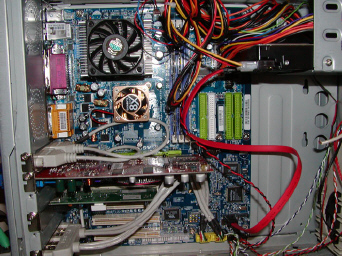 Image 6
|
|
|
133.
|
In Image 6 the type of hard drive used provides for:
|
|
|
134.
|
Why learn DOS?
|
|
|
135.
|
Which of the following is a consideration when purchasing a mothboard? (Choose
all that apply)
|
|
|
136.
|
SRAM
|
|
|
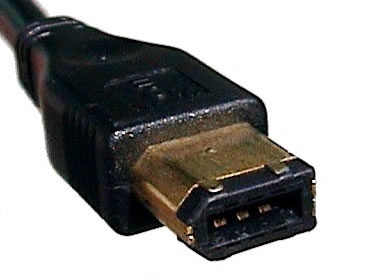 Image 1-1
|
|
|
137.
|
What kind of connector is shown in exhibit 1-1? Select all that
apply.
|
|
|
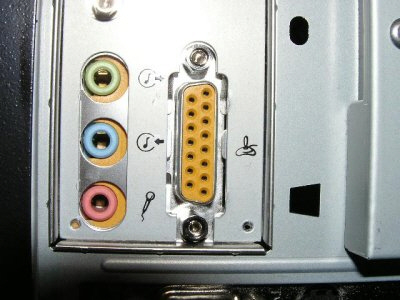 Image 1-8
|
|
|
138.
|
In image 1-8 you are looking at (select all that apply).
|
|
|
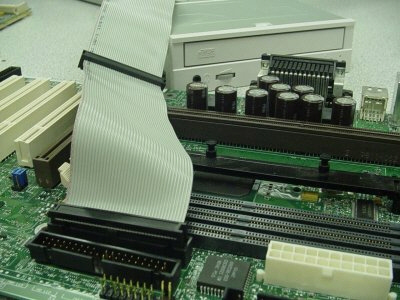 Image 1-9
|
|
|
139.
|
In image 1-9 you are looking at (select all that apply).
|
|
|
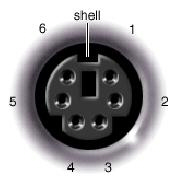 Image 1-10
|
|
|
140.
|
In image 1-10 you are looking at (select all that apply).
|
|
|
 Image 1-13
|
|
|
141.
|
The port in image 1-13 is (select all that apply):
|
|
|
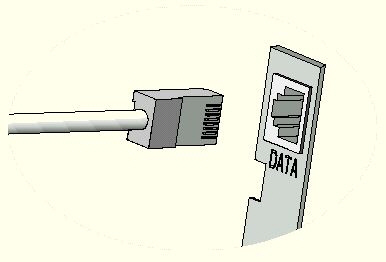 Image 1-14
|
|
|
142.
|
The port in image 1-14 is (select all that apply):
|
|
|
143.
|
What are advantages of LVD SCSI over SE SCSI? (Select all that apply)
|
|
|
144.
|
Which of the following steps should be taken when upgrading from Windows 2000 to
Windows Vista? (Select all that apply)
|
|
|
145.
|
Which of the following troubleshooting steps might help you isolate a
motherboard problem? Select all that apply.
|
|
|
146.
|
You suspect a malicious user is trying to gain access to your computer via the
network. What two things can you do to track this activity?
|
|
|
147.
|
You are troubleshooting a computer that has a new motherboard with integrated
video installed. When you boot up for the first time you hear a beep, but get no video. What three
things should you do to troubleshoot this problem?
|
|
|
148.
|
A computer crashes intermittently. You suspect heat is the problem. What three
things might indicate that you’re on the right track.
|
|
|
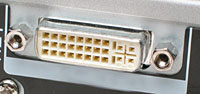 1-18
|
|
|
149.
|
The port in 1-18 would support: (Select all that apply)
|
|
|
150.
|
What files can be removed when you run the disk cleanup tools in Windows XP?
Select all that apply.
|
|
|
151.
|
You added a new hard drive to your system because the old one was filling up.
Whenever you print small jobs, it prints fine. But when you go to print large jobs with a lot of
graphics, you have problems and sometimes it won’t print. You’ve reinstalled the printer,
checked the logs, but you can’t figure out what the difference is. What can you do to resolve
this problem? Select all that apply.
|
|
|
152.
|
Your friend is asking about overclocking his CPU. What should you tell him about
overclocking?
|
|
|
153.
|
You are creating a manual for your users to follow. Which of the following three
would be best practices?
|
|
|
154.
|
You work for a very large company. Your supervisor requires you document
everything you do with all hardware. Which of the following would be the most likely reason for this
policy?
|
|
|
155.
|
You are replacing your CRTs with LCDs. Why should you not throw the CRTs in the
garbage? Choose all reasons that apply.
|
|
|
156.
|
You are interested in offering your customers a monthly computer maintenance
program. What things might you include in this program? Select all that apply.
|
|
|
157.
|
What steps can you take to reduce the changes of ESD?
|
|
|
158.
|
What are the two types of Express Cards?
|
|
|
159.
|
What are the types of PCMCIA Cards?
|
|
|
160.
|
Which of the following would be integral tools for a technician’s
toolkit?
|
Completion
Complete each
statement.
|
|
|
161.
|
The ____ is the first software the loads when you start the computer. It
contains information for what is installed on the computer.
|
|
|
162.
|
A set instructions that directs hardware to perform a task.
|
|
|
163.
|
On state
|
|
|
164.
|
Off state
|
|
|
165.
|
A __ is a pathway of communication that includes the protocol and the method of
communication.
|
|
|
166.
|
The ___ clock is a crystal that times activities on chips and makes sure
everything runs beautifully
|
|
|
167.
|
The ____________________ command displays the directory structure of a hard
drive or disk.
|
|
|
168.
|
Windows 9x ____________________ are equivalent to DOS subdirectories.
|
|
|
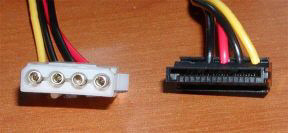 Image 5
|
|
|
169.
|
In Image 5 the power connector on the right is a __________ connector (use the
acronym).
|
|
|
170.
|
This RAM needs constant refreshing in order to maintain the integrity of its
data.
|
|
|
171.
|
This is very fast RAM that holds onto data that the CPU is currently using in
its processes. It speeds up processing and is ultra cool.
|
|
|
172.
|
___ ___ is the act of a computer storing data or instructions in SRAM for
quick storage and retrieval.
|
|
|
173.
|
ROM ____ is the act of copying the entire contents of the ROM chip into RAM on
startup
|
|
|
174.
|
One or more sectors that constitute the smallest unit of space on a disk for
storing data (also referred to as a file allocation unit).
|
|
|
175.
|
On a disk surface, one segment of a track, which almost always contains 512
bytes of data. Sometimes a single wedge of the disk surface is also called a ____.
|
|
|
176.
|
A ____ state is required after a CPU performs a task to ensure the task is
completed before it starts on another task.
|
|
|
177.
|
In a 16 bit BUS, __ bits of data can be transferred at a time.
|
|
|
178.
|
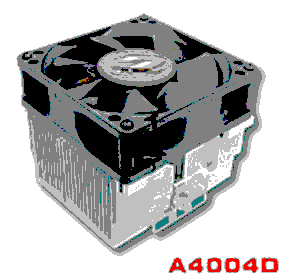 This happy little camper is a
_____
|
|
|
179.
|
A BIOS chip can be updated or modified by using a ___ program provided by the
manufacturer.
|
|
|
180.
|
____ mastering is a card with its own processor. This allows it to run
completely separate from the CPU, meaning it can run faster.
|
|
|
181.
|
Firewire can support up to __ devices on one port.
|
|
|
182.
|
This process is used by laser printers to produce images
|
Matching
|
|
|
Match the following to the kind of RAM or ROM. Answers will be used more than
once. a. | SRAM | c. | Flash memory | b. | DRAM |
|
|
|
183.
|
Made up of capacitors that only hold a charge for a very short time.
|
|
|
184.
|
More expensive than DRAM
|
|
|
185.
|
Most computers have a lot of this.
|
|
|
186.
|
Most computers have a little of this.
|
|
|
187.
|
Can be used to speed of the processing of the CPU
|
|
|
188.
|
Made up of transisitors that hold a charge
|
|
|
189.
|
Refreshed every 4 milliseconds or so
|
|
|
190.
|
Does not require memory addresses
|
|
|
191.
|
Can be changed using either electricity or ultraviolet light, depending on the
kind of chip
|
|
|
192.
|
Considered non-volotile
|
|
|
193.
|
Used for cache
|
|
|
194.
|
Acts like secondary storage but is not magnetic
|
|
|
Match the DOS command to its function. Some answers may be used more than
once.
a. | MEM | g. | HIMEM.SYS | b. | DEVICEHIGH | h. | 0-640KB | c. | LOADHIGH | i. | 640KB-1024KB | d. | DOS=HIGH | j. | Above 1024KB | e. | DOS=UMB | k. | First 64KB of Extended Memory | f. | EMM386.exe |
|
|
|
195.
|
Can be found in either config.sys or autoexec.bat.
|
|
|
196.
|
A driver that allows DOS to have access to memory over 640KB
|
|
|
197.
|
Used to load programs or OS components into high memory.
|
|
|
198.
|
A driver that allows DOS to access high memory. You install this driver by
using the DEVICE or DEVICEHIGH command in config.sys
|
|
|
199.
|
High Memory
|
|
|
200.
|
Extended memory
|
|
|
201.
|
Upper memory
|
|
|
Match the port to its description. 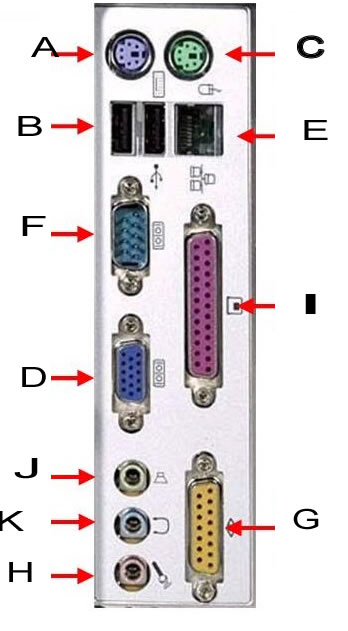
|
|
|
202.
|
microphone
|
|
|
203.
|
parallel
|
|
|
204.
|
speakers/line out
|
|
|
205.
|
VGA
|
|
|
206.
|
line in
|
|
|
207.
|
mouse
|
|
|
208.
|
USB
|
|
|
209.
|
network
|
|
|
210.
|
serial
|
|
|
211.
|
joystick
|
|
|
212.
|
RJ45
|
|
|
213.
|
game port
|
|
|
214.
|
video
|
|
|
215.
|
Ethernet
|