Lab 3-3 Installing Active
Directory
Before you start:
- If
you don’t have your Server 2008 DVD, be sure to have the ISO available.

- Check
your computer name on both of your ADDC servers. If they are some funky
name, change them so it’s something easy to spell. NO LEET SPEAK.
- You’re
going to install Active Directory on your server. That will turn the
server into a Domain Controller, or an Active Directory Domain Controller
(which is why we named the virtual servers ADDC1 and ADDC2).
- Read
on about Active Directory so you know what you’re doing.
Active directory is a directory that contains information
about all of the objects in your network. Objects can be users, computers,
shared folders, shared printers, organizational units*, etc. It also contains
information about programs, what services are available and where to find them,
security access, permissions, etc. In other words, it knows EVERYTHING about
the stuff in your domain and controls access to those things.
AD is REALLY powerful. We’re going to do the main Active
Directory stuff in this class, but we’ll only scratch the surface. You can do
some super cool stuff with AD!
The basic building blocks of Active Directory are Domains,
Domain Controllers, Trusts, Users, Groups, Forests, Organizational Units,
Sites, Replication, and the Global Catalog.
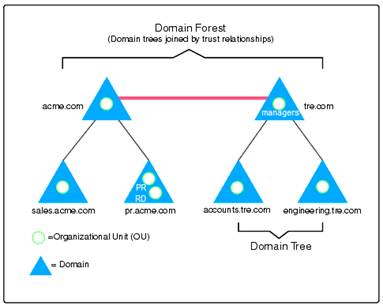
Here we have two forests. A forest is a collection of
domains. A domain is a collection of users, organizational units, computers,
servers, shares, etc.
We’ll learn more as we go along.
Directions
- Log
into your server as an administrator.
- Hyper
V Manager.
- Start
your ADDC1 server and log it in. Check the computer name. If
it is a funky name, rename it a single, easy to spell word. We’ll be
using UNC pathnames so you don’t want to have to type \\win-22390ea24 when it would be a
lot easier to remember \\snappy and \\slappy (that’s what I named mine). Restart
after naming.
- Under
Customize this Server select Add
Roles
- Select
Active Directory Domain Services
- It
will tell you that you have to add the .NET framework, so say Add Required Features.
- Read
the Introduction to Active Directory Domain Services and answer the
questions to the right.
- BEFORE YOU CONTINUE, MAKE SURE YOU
ARE NOT DOING THIS ON YOUR ORIGINAL SERVER. IT SHOULD BE ON
ADDC1.
- Select
install. It can take awhile to install. If you didn’t answer the
questions to the right, you can look up the answers online.
- Click
close when it’s finished. Make sure it says “successful” under both
items you installed.
|
1.
What is the minimum number of Domain
Controllers you should have in one network?
2.
Why?
3.
AD DS will require _____________ to be
installed.
4.
What do you do if you don’t have that?
5.
After you install the role, what do you have
to do to make the server a fully functional domain controller?
6.
What are three other things AD will install?
|
- Open
Server Manager to ensure that your new role was installed correctly. Ruh
Roh! Nothing is going on yet! Why is that? Well you need to actually
PROMOTE your server to a Directory Controller. So how do you do that?
- Right
click on the CMD program and select run
as an administrator.
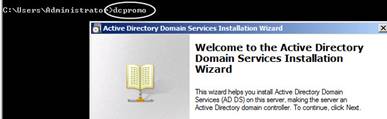
- Type
the word dcpromo (domain
controller promoter) at the command prompt. ONLY an administrator can
installed the ADDS so you have to run as an admin.
- Since you’re a new user, just click next. Do not go into Advanced
Mode.
|
|
- You’re
going to get some information about OS compatibility. Read it if you
like. Press Next.
- It’s
going to ask you whether you want a new or existing forest. A forest is
a collection of domains. Since this is your first domain and
your first domain controller, you are going to select create a new domain in a
new forest.
- A
domain is a collection of computers that share the same namespace
(example Microsoft.com, Redmond.microsoft.com, Bellevue.microsoft.com).
- Click
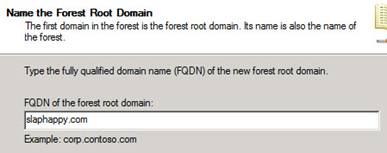
next. FQDN=Fully Qualified Domain
Name. You’re going to create a root
domain name. csn.com is OUR domain name, so you can come up with
something good…but let’s not be childish. And NO LEETSPEAK! Srsly.
You’ll be in big bad trouble. Go ahead and use .com. (Example,
slaphappy.com.) The root is the first domain in your forest.
- Hit
next.
|
|
- It’s
going to ask you if you’re all 2008 or have older servers. We may put a
2003 server into our domain, so leave the Forest Functional Level at
2003. What this means if is you have even ONE older server acting as a
domain controller in your network, you have to have the FFL down to its
level. At native level (2008) it has more options and features.
- You’re
going to do the same with domain functional level. Same deal, but at a
domain level.
|
|
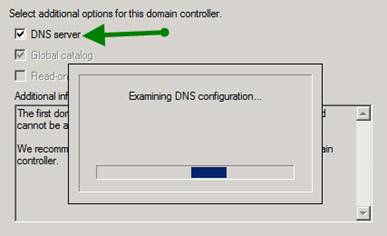
- It’ll
now exam your DNS. You don’t have a DNS so it will tell you that and
give you the option of either installing DNS or accessing another
computer’s DNS. For this server, we will install a DNS. So just allow it
to install DNS (where it says additional options for domain controller).
- Notice
that Global catalog is also going to install. The reason is, your root
domain always holds the global catalog.
- The
global catalog is like a catalog that has every single item indexed in
it that is a part of the entire forest. It’s like Dex, but cooler and
not bald.
- Ruh
Roh, there is no delegation for our DNS server! That’s because this is
our first one. When you have a delegation, that means that you have
another DNS that has all the files for all of the computers in the
domain. Go ahead and say yes to continue because this will become the
Zone Authority.
|
|
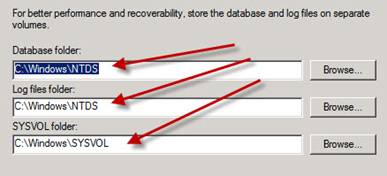
- The
next screen will ask where you want to store your log files and your
SYSVOL folders. Go ahead and it store in C:\
- Create
a STRONG PASSWORD! We’ll use P@ssword.
- Review
your summary. Does everything look correct? If so, click install.
- Note
that it will “talk” about what it is doing. This can take awhile, and
you can’t turn off your computer while it’s doing it.
- Nor
can you install ADDC on your other domain controller because it’s going
to be a backup domain controller. Sorry.
- Click
“Reboot on completion” and answer the questions below.
- Note,
when it reboots it takes a LONG time to restart to the point where you
can log in. This only happens the first time as it sets up all the new
services so don’t panic.
|
|
Questions
1.
What is Active Directory?
2. What things are
the building blocks of Active Directory?
3. What server did
you install AD on?
4. What is DCPromo?
5. Why put the forest
functional level at server 2003?
6.
If you have one server that is 2003, and three that
are 2008 and all are ADDCs (Active Directory Domain Controllers), what Domain
Functional Level do you set it at?
7. What is a forest?
8.
What is a domain?
9. What is your root
domain?
10. What did you name
it?
11. What three roles
are you installing on your server?
12. What is a global
catalog?
13.
What domain holds the global catalog?