Lab L-4 Creating Users and Folder Permissions in Linux
In order to
allow regular users to create documents that save in the /var/www/html
folder you’re going to need to modify the permissions. This is a good place to
learn about permissions in Linux.
|
Do this |
It’ll look like this |
||||||||||||||||||||
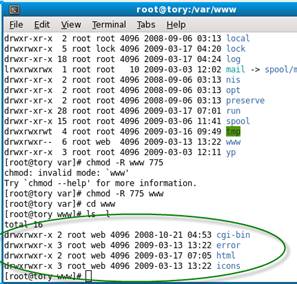
How to: Change group ownership
Permissions on files Below is an example of how a file may be
listed when typing ( ls -l
) at the prompt as well as information on how to interpret it. -rw-rw-r-- 1 hope
web 123 Feb 03 15:36 file.txt
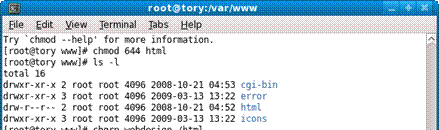
To change modes (chmod)
use the following numbers. This seems hard, but it’s really not: CHMOD can also to attributed by using
Numeric Permissions: 400 read by owner So if you want to change the mode of a
file named fred so that the owner can read, write,
and execute you add together the read (4) the write (2) and the execute (1) =
7 so the command would be Chmod 7 fred Or to make it easy 7=rwx 6=rw- 5=r-x 4=r-- 3=-wx (which
would be strange) 2=-w- 1=--x 0=deny all So if I want to the folder, HTML
owner=RWX, Group=RWX, and everyone else=R— I would type the command chmod 774 html Alternative I can do one type at a
time. So if I wanted the owner to be RWX I could type Chmod u=rwx html That sets the first set. Then I could
do chmod g=rwx html and
finally o=r |
Oops! It won’t let me put a space in, so we’ll just say
web.
|
||||||||||||||||||||
|
|
||||||||||||||||||||
|
Before you do this…ask yourself “What numbers do I use to
change the folder permissions in one command?”
|