True/False
Indicate whether the
statement is true or false.
|
|
|
1.
|
In inkjet printers, the print-head moves across the paper and forces out a
series of dots made of ink.
|
|
|
2.
|
In inkjet printers, the print-head moves across the paper and forces out a
series of dots made of ink.
|
|
|
3.
|
You can print photos with inkjet printers and they’ll look good, but
won’t last as long and are not waterproof.
|
|
|
4.
|
Recycled cartridges for inkjet printers are just as good as new ones.
|
Multiple Choice
Identify the
choice that best completes the statement or answers the question.
|
|
|
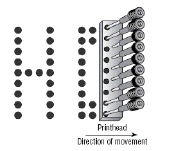 Image 2-1
|
|
|
5.
|
Image 2-1 represents what?
a. | daisywheel printer | c. | dye sublimation printer | b. | impact
printer | d. | inkjet
printer |
|
|
|
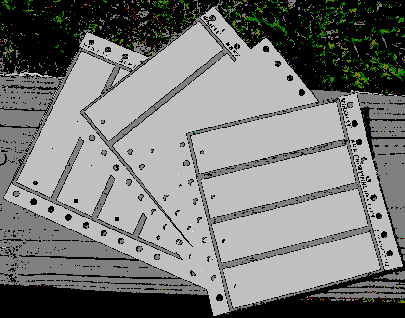 2-2
|
|
|
6.
|
The paper in image 2-2 would be used in what kind of printer?
a. | laser | c. | dot matrix | b. | ink jet | d. | thermal wax
transfer |
|
|
|
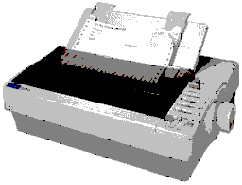 2-4
|
|
|
7.
|
The printer in 2-4 is a ______ printer
a. | dot-matrix | c. | laser | b. | ink jet | d. | thermal wax
transfer |
|
|
|
8.
|
What is a reason companies still use dot-matrix printers?
a. | Because they are very reliable | c. | Because they have excellent dpi
rating | b. | To print mult-part forms | d. | Because they are quiet |
|
|
|
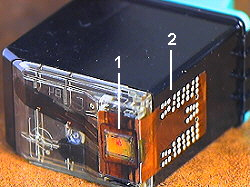 2-5
|
|
|
9.
|
The image shown belongs with what type of printer? (image 2-5)
a. | Inkjet | c. | dot matrix | b. | laser | d. | impact |
|
|
|
10.
|
What are the steps of the laser printing process in order?
a. | charging, writing, developing, fusing, transferring, cleaning | c. | cleaning, writing,
developing, transferring, fusing, charging | b. | charging, developing, writing, transferring,
fusing, cleaning | d. | cleaning,
charging, writing, developing, transferring, fusing |
|
|
|
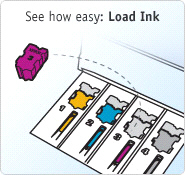 Image
2-6
|
|
|
11.
|
In image 2-6, what kind of printer uses this ink?
a. | dye sublimation | c. | laserjet | b. | solid ink | d. | ink jet |
|
|
|
12.
|
This type of printer uses ink that is melted onto the paper. No toner is
involved.
a. | laser jet | c. | dye jet | b. | sublimation | d. | solid ink |
|
|
|
13.
|
Which type of printer is more “green”?
a. | solid ink | c. | dye sublimation | b. | laser jet | d. | dot matrix |
|
|
|
 Image 2-7
|
|
|
14.
|
In Image 2-7 shows a _____________________
a. | dye sublimation printer | c. | ink jet printer | b. | laser jet
printer | d. | scanner |
|
|
|
15.
|
In Image 2-7 E refers to the
a. | mirror | c. | CCD | b. | filter | d. | lens |
|
|
|
16.
|
In Image 2-7 D refers to the
a. | mirror | c. | CCD | b. | filter | d. | lens |
|
|
|
17.
|
In Image 2-7 C refers to the
a. | Single-lamp light source | c. | CCD | b. | filter | d. | lens |
|
|
|
18.
|
In Image 2-7 B refers to the
a. | Single-lamp light source | c. | CCD | b. | filter | d. | lens |
|
|
|
19.
|
Most scanners speak
a. | English | c. | TWAIN | b. | Spanish | d. | TRAIN |
|
Multiple Response
Identify one
or more choices that best complete the statement or answer the question.
|
|
|
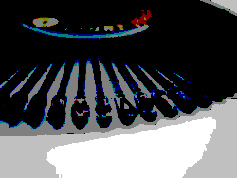 2-3
|
|
|
20.
|
The image 2-3 represents what kind of print head? (Select all that
apply)
|
|
|
21.
|
How many pins on a dot matrix print head (choose two).
|
|
|
22.
|
How is paper fed through a dot-matrix printer? (Choose two)
|
|
|
23.
|
What are some features of current inkjet printers?
|
|
|
24.
|
Which of the following are components in the laser toner cartridge?
|
|
|
25.
|
Which of the following are components in the laser scanning assembly?
|
|
|
26.
|
What are the three types of thermal printers?
|
|
|
27.
|
What are the three parts of the windows printer process?
|
Completion
Complete each
statement.
|
|
|
28.
|
This process is used by laser printers to produce images
|
Matching
|
|
|
Label the parts of a laser printer cartridge 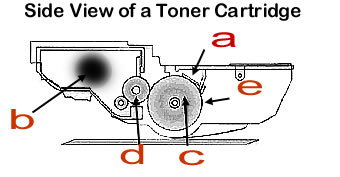
|
|
|
29.
|
Charge corona assembly
|
|
|
30.
|
Developer roll
|
|
|
31.
|
cleaner blade
|
|
|
Printer Types a. | Uses pens to create line images. | e. | Coated paper is used. Dots are
burned directly onto the paper. Monochrome. | b. | Uses a stick of wax that is melted to create
ink which is then sprayed onto the drum. | f. | Uses special paper with embedded pigments. Paper passes under a printhead three
times, using different temperatures to bring forth the pigments. UV light sets the
colors. | c. | Solid dye is contained in a ribbon or roll. Heated print heads push against the
ribbon and melt the ink onto the paper | g. | Ink is sprayed through tiny nozzles onto paper. | d. | A heating element
melts wax on a ribbon to create a permenant image | h. | Using an electrophotostatic process, charged
toner particles are fused onto paper |
|
|
|
32.
|
Thermal wax transfer
|
|
|
33.
|
Plotter
|
|
|
34.
|
Direct thermal transfer
|
|
|
35.
|
Ink or bubble jet
|
|
|
36.
|
Laser
|
|
|
37.
|
Solid ink
|
|
|
Match the Windows Print Process step with its description. a. | Client | c. | Printer | b. | Spooler |
|
|
|
38.
|
User sends job to the printer.
|
|
|
39.
|
winspool.drv issues an RPC to spoolsv.exe
|
|
|
40.
|
Program calls forth the GDI
|
|
|
41.
|
spoolsv.exe calls spools.dll
|
|
|
42.
|
GDI transfer to the job to spooler
|
|
|
43.
|
Spooler sends the job to the printer share/driver
|
|
|
44.
|
localspl.dll routes the job either to the local printer or remote print
server
|
|
|
45.
|
Print language is translated into something the printer can understand
|
|
|
|
|
|
46.
|
Ribbon cable
|
|
|
47.
|
Paper feed
|
|
|
48.
|
Paper feed stepper motor
|
|
|
49.
|
Printhead assembly
|
|
|
50.
|
Ink cartridges
|
|
|
51.
|
Control circuitry
|
|
|
52.
|
Belt
|
|
|
53.
|
Printhead stepper motor
|
|
|
54.
|
Stabalizer bar
|
|
|
55.
|
Paper advance rollers
|
|
|
Label the parts of the scanner assembly 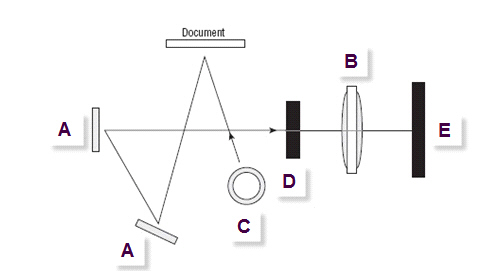
|
|
|
56.
|
mirrors
|
|
|
57.
|
lens
|
|
|
58.
|
light source
|
|
|
59.
|
filters
|
|
|
60.
|
CCD
|