Multiple Choice
Identify the
choice that best completes the statement or answers the question.
|
|
|
1.
|
Frodo's network card stops working in his PC. He has another brand of
network card in another PC that is working fine. He decides to use that network card in his other PC
so he can get back to work. The first PC is Windows NT.
He opens up the PC and installs the
card into an open PCI slot. he ensures that the card is properly seated and screwed into place. He
attaches an RJ 45 network cable to the back of the card. However when he turns on the computer and
attempts to connect to his network, he can't connect. He looks at the back of the computer and
notes that the lights are not blinking. What is most likely the problem?
a. | The network card is malfunctioning. | b. | He has not installed the proper network card
driver in his PC. | c. | The network cable does not
work. | d. | The PCI slot is malfunctioning. |
|
|
|
2.
|
The ____ supports the CPU by controlling many system board activities.
a. | RAM | b. | EPROM | c. | CMOS | d. | chip set |
|
|
|
3.
|
This was the first operating system to support plug and play. (It was available
in S/R 2.)
a. | Windows 3.3 | b. | Windows 95 | c. | Windows
98 | d. | Windows NT |
|
|
|
4.
|
This Windows operating system was not plug and play in any release.
a. | Windows 98 | b. | Windows 2000 | c. | Windows
NT | d. | Windows 95 |
|
|
|
5.
|
Because ROMs (hardware) have instructions and data etched into them (software)
they are sometimes referred to as ____.
a. | RAMware | b. | firmware | c. | vaporware | d. | hardware/software |
|
|
|
6.
|
The term ____ refers to the set of instructions that directs the ____ to
accomplish a task.
a. | driver, hardware | b. | hardware, driver | c. | driver,
firmware | d. | firmware, hardware |
|
|
|
7.
|
The ____ ensures that all activities are performed in a synchronized
fashion.
a. | CPU | b. | real time clock | c. | system
clock | d. | system bus |
|
|
|
8.
|
What happens when you turn on your computer?
a. | The power comes on, the computer goes through a power on self test, the operating
system takes over and boots your machine. | b. | The power comes on, the BIOS runs a power on
self test, the operating system eventually takes over and boots your machine. | c. | The power comes on,
the operating system runs a power on self test and then boots your machine. | d. | The power comes on,
commands from the operating system tell the BIOS to start a power on self test, it then boots your
machine. |
|
|
|
9.
|
Hardware stores data and communicates with software by only one fundamental
method, ____.
a. | binary | b. | trinary | c. | decimal | d. | hexadecimal |
|
|
|
10.
|
This operating system was the basis for Linux.
a. | UNIX | b. | Windows 95 | c. | Windows
2000 | d. | Windows NT |
|
|
|
11.
|
CJ installed a new sound card into his computer. He turns it on, pops in a CD,
and sits back. Nothing. The computer seems to be starting just fine. He can run all of his programs,
but no sound comes out! What might be going on with this new device?
You are troubleshooting
his problem, what is the first required component in computing that you might suspect?
a. | Not enough information is given to troubleshoot this problem. | b. | A method for the CPU
to communicate with the device is missing. | c. | Electricity to power the
device. | d. | Software that instructs and controls the device. |
|
|
|
12.
|
The ____ is the most complicated piece of equipment inside the case.
a. | video card | b. | system board | c. | CD-ROM | d. | floppy drive |
|
|
|
13.
|
After startup, what type of software provides instruction to the hardware to
perform tasks?
a. | Application software | b. | BIOS | c. | All three types of
software work together through the operating system | d. | Operating
system |
|
|
|
14.
|
Kami brings you a cable that looks like the accompanying picture. She asks you
to identify it. You tell her it is:  a. | A cable for a keyboard | b. | A cable for a printer | c. | A cable for a
mouse | d. | A cable for a computer monitor |
|
|
|
15.
|
Gandalf is looking at the inside of his computer. He was installing a video card
and accidentally slipped with a screwdriver (don't ask me why he was using a screwdriver to
install a video card on the INSIDE of the machine, but he's from a different time). The
screwdriver slipped and scratched across a couple of gold lines on the motherboard.
Since this
happened he has had a number of errors. Most of them have been memory dumps. What would you suggest
he do?
a. | Buy a new motherboard. He has damaged the lines that carry data and/or power to the
different components of the computer. He's probably damaged some lines that are related to
carrying data to and from RAM. | b. | Take his computer to repair shop. Have them
upgrade the RAM in his machine to faster RAM. Also have them install more RAM. | c. | Uninstall and
reinstall all of his software. RAM dumps are often due to misfiring commands in commonly used
programs. | d. | Back up everything on his computer and delete his main partition. Use a DOS disk to
run FDISK. Create a new partition, set it to active, and reinstall his operating system. Restore his
data from the backup and reinstall all of his software. |
|
|
|
16.
|
This component is responsible for almost all of the processing done by the
computer.
a. | Processor | b. | CPU | c. | Microprocessor | d. | All of these |
|
|
|
17.
|
This software allows the user to interact directly with the computer to do
things such as copy or save files, delete files, name or rename files.
a. | All three types of software work together through the operating
system | b. | Application software | c. | BIOS | d. | Operating
system |
|
|
|
18.
|
Both keyboard and mouse receive input mechanically, and this movement is
converted to ____ data that is input into the computer.
a. | binary | b. | hexadecimal | c. | decimal | d. | trinary |
|
|
|
19.
|
Krakatoa V. Cano has an older motherboard and has a newer video card. He read
that the video card will be supported with a BIOS upgrade. His friend has a different motherboard and
has a FLASH program. Krakatoa borrows the flash program from his friend and attempts to flash his
BIOS.
What will be the probable outcome.
a. | The new BIOS software will be written to the ROM chip and the motherboard will now
support the video card. | c. | The motherboard will be rendered useless. | b. | The flash program
won’t work. | d. | The new
BIOS software will be written to the ROM chip but it won’t support the new video card. However
it should still work. |
|
|
|
20.
|
External devices communicate with what is inside the case through cables
attached to the case at a connection called a ____.
a. | outlet | b. | port | c. | drop | d. | connection |
|
|
|
21.
|
C:\>
a. | Command driven interface | b. | Prompt driven interface | c. | Icon driven
interface | d. | Menu driven interface |
|
|
|
22.
|
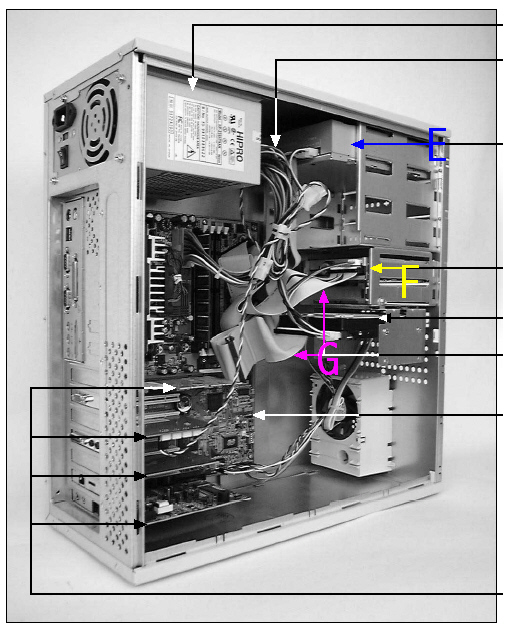 E refers to: a. | Floppy drive | b. | CD ROM | c. | IDE Ribbon
cables | d. | Hard drive |
|
|
|
23.
|
____ are circuits that enable data, instructions and power to move from
component to component on the system board.
a. | Traces | b. | Adapter cards | c. | Grid
lines | d. | Expansion slots |
|
|
|
24.
|
A ____ is the smallest unit of display on a monitor.
a. | phosphor | b. | pixel | c. | character | d. | dot pitch |
|
|
|
25.
|
Which of the following cannot be modified?
a. | WORM | c. | EPROM | b. | EEPROM | d. | ROM |
|
|
|
26.
|
This secondary storage can be carried in your pocket and has capacities of
128MB, 512MB, and up to (or even over) 1GB.
a. | Floppy disks | c. | Pen drives | b. | Zip Drives | d. | CD ROMs |
|
|
|
27.
|
____ is used to hold data and instructions as they are processed.
a. | Random access memory | b. | COAST | c. | ROM | d. | EPROM |
|
|
|
28.
|
This can be used to house many virtual operating systems on one computer.
a. | Virtual DOS | c. | Virtual Reality | b. | Virtual PC | d. | Virtual
machines |
|
|
|
29.
|
What is the default ‘host key’ in Windows Virtual PC?
a. | Left ALT | c. | ALT-SHIFT | b. | Right ALT | d. | CTRL-ALT-DEL |
|
|
|
30.
|
The operating system you have installed on your “real” PC upon which
you install Virtual PC is called the _____ OS.
a. | Guest | c. | Chicken | b. | Host | d. | Main |
|
|
|
31.
|
The operating system you install within Virtual PC is called the _____
OS.
a. | Guest | c. | Chicken | b. | Host | d. | Main |
|
Multiple Response
Identify one
or more choices that best complete the statement or answer the question.
|
|
|
32.
|
Which of the following would be considered an output device?
|
|
|
33.
|
Which of the following is a way to attach a mouse to a computer?
|
Completion
Complete each
statement.
|
|
|
34.
|
A set instructions that directs hardware to perform a task.
|
|
|
35.
|
Software talks to hardware using ____ code.
|
|
|
36.
|
Off state
|
|
|
37.
|
Expansion cards may also be called ___ boards.
|
|
|
38.
|
A __ is a pathway of communication that includes the protocol and the method of
communication.
|
True/False
Indicate whether the
statement is true or false.
|
|
|
39.
|
Permanent storage is temporary.
|
|
|
40.
|
Windows NT is more efficient because user applications software can directly
access the hardware.
|
|
|
41.
|
The two versions of Windows NT are Workstation and Server.
|
|
|
42.
|
Expansion slots are used to connect the CPU to system board components.
|
|
|
43.
|
Primary storage is temporary.
|
|
|
44.
|
All devices in a computer are either installed directly on the system board,
directly linked with a cable or indirectly linked through an expansion card.
|