Lab
6-8 Changing the File System Type
Objective
Sometimes you have a hard
drive that is formatted FAT but you want the security of NTFS. You would think
you’d have to format it all over again and lose your data, right?
Wrong! There is a little
utility that will allow you to change the way the drive is formatted from FAT
to NTFS.
Note: You cannot convert
from NTFS to FAT because of how the vector table is stored in NTFS. Think of it
the same way you can use an old device in a newer port (say you can use a SATA
1.5 drive with a SATA 2.0 port) but you can’t use the new stuff in the old
port.
Materials Required
- One small partition on your drive that is
formatted in FAT
- DOS boot floppy with FDISK on it
Lab Setup & Safety Tips
- Each workstation’s hard drive should contain one
unformatted primary partition that has been set as active during lab 6-1.
- You should have completed lab 6-2 to ensure your
hard drive is defragmented and has been checked
for errors.
Here we go
- Boot into Windows XP.
- Ensure that you have one small formatted
partition on your drive and that it is formatted FAT. IF YOU DO NOT, DO NOT CONVERT YOUR C: DRIVE TO FAT OR YOU WILL NOT
BE ABLE TO BOOT INTO WINDOWS 98!
- What drive letter is assigned to your small
partition? (It should be probably E or F.)
- At the command prompt type convert driveletter:
/FS:NTFS
- What you’re saying is:
 Convert the drive at this letter
- From FS FAT
to
- NTFS
- Give the drive a volume label of mydrive.
- Press enter and it will tell you if you can do
this or not.
- If you were to install XP on a FAT32 on a single
hard drive and you converted, the conversion would take place next time
you rebooted your computer. If you looked in computer management, it would
still say it was FAT.
- If you convert a partition on a drive that
contains multiple partitions, the conversion takes place right away. Check
it out.
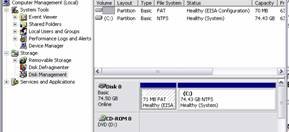
- Open computer management
- Look in Disk management
- Take a screen shot and print it. Attach it to
your lab report.
Review Questions
Circle True or False.
- You can convert an NTFS partition to FAT without losing data? True or false
- You can convert a FAT32 partition to FAT16 without losing data? True or false
- What is the benefit of FAT16 over FAT32?
- What is the benefit of FAT32 over NTFS?
- What is the benefit of NTFS over FAT?