Lab 5-2: Using a Recovery Tool in DOS
Objectives
4 Using DOS, recover files from a bad floppy.
4 Use the program to locate and recover files.
Note: If your computer does not have a floppy, work with a partner.
- Download a copy of RecoverFD from our website.
- Unzip it and write down where the file was unzipped (probably c:\unzipped\rfd14[1]). You will need this to run the program. ________________________________________________________
- Boot into Windows 98 and open the command prompt.
- Get a floppy disk from me. Put a bunch of files onto it. It doesn’t matter what they are. Just make some quick text and paint files and give them names. Create one or two directories (folders) and throw some stuff in there too.
- Head on into DOS.
- Navigate to the folder that your recovery tool is located in.
- Type recovrfd and hit return. It will show you a list of switches that can be used with the program. It should look like this.
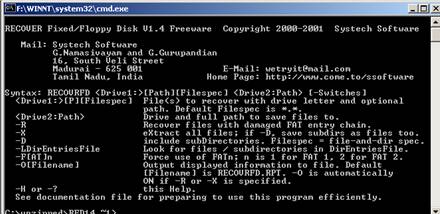
- List the switches you can use with this program. A switch is a modifier that works with a command.
|
Switch |
What it does |
|
|
|
|
|
|
|
|
|
|
|
|
|
|
|
|
|
|
- Type recovrfd a: List what you see:
|
|
- Do you see folders (directories)? Why or why not?
- What command do you type to show directories?
- Do that. Take a screenshot and attach to your lab report.