True/False
Indicate whether the
statement is true or false.
|
|
|
1.
|
It is not possible to view IRQ assignments in Windows 9x.
|
|
|
2.
|
A ROM chip has software instructions permanently etched into it during
fabrication.
|
|
|
3.
|
Virtual memory refers to the process of using the hard drive as though it were
RAM.
|
|
|
4.
|
Worms require a host file to replicate.
|
|
|
5.
|
A DMA channel provides a way for a device to pass data to/from memory without
involving the CPU.
|
|
|
6.
|
A common method for a virus to propagate itself is to change the interrupt
handler location in the vector table to another program, in this case the virus' infecting
code.
|
Multiple Choice
Identify the
choice that best completes the statement or answers the question.
|
|
|
7.
|
____ are used to pass data back and forth between a hardware device and
memory.
a. | DMA channels | b. | IRQ's | c. | I/O
addresses | d. | Memory addresses |
|
|
|
8.
|
POST stands for ____.
a. | partial operating system test | b. | power-off self-test | c. | power-on
self-test | d. | pre-operational system test |
|
|
|
9.
|
____ contains software to manage files, run applications software, and interface
with hardware.
a. | IO.SYS | b. | MSDOS.SYS | c. | COMMAND.COM | d. | AUTOEXEC.BAT |
|
|
|
10.
|
____, a hidden system file, contains more BIOS software.
a. | IO.SYS | b. | MSDOS.SYS | c. | COMMAND.COM | d. | AUTOEXEC.BAT |
|
|
|
11.
|
Upon completion of the boot process, ____ is the program in charge.
a. | IO.SYS | b. | MSDOS.SYS | c. | COMMAND.COM | d. | AUTOEXEC.BAT |
|
|
|
12.
|
When a peripheral device signals the CPU by placing voltage on a specific bus
line, it said to be issuing a ____ interrupt.
a. | software | b. | bus | c. | system | d. | hardware |
|
|
|
13.
|
One of the few devices that uses polling to get serviced by the CPU is a
____.
a. | scanner | b. | printer | c. | joystick | d. | monitor |
|
|
|
14.
|
____ addresses are numbers that the CPU can use to access hardware
devices.
a. | Memory | b. | I/O | c. | Device | d. | DMA |
|
|
|
15.
|
When more than one device uses the same DMA channel, the result is a DMA
____.
a. | conflict | b. | change | c. | reverse | d. | resolution |
|
|
|
16.
|
When software requires interaction with a device, it signals the CPU with a
____.
a. | CPU interrupt | b. | hardware interrupt | c. | software
interrupt | d. | vector request |
|
|
|
17.
|
Using DIP switches or jumpers to store configuration is inconvenient because
____.
a. | it requires a special tool | b. | it takes too long | c. | users have problems
understanding the schematics | d. | it requires opening the
case |
|
|
|
18.
|
When setting a DIP switch, ON equates to a binary ____ and OFF equates to a
binary ____.
|
|
|
19.
|
The error "CMOS checksum error" usually indicates that the ____ has
failed.
a. | math coprocessor | b. | arithmetic logic unit (ALU) | c. | CMOS
battery | d. | CMOS chip |
|
|
|
20.
|
When protecting your data, the best plan is to ____.
a. | back up | b. | use an UPS | c. | use antistatic
spray | d. | always power down when not using the computer |
|
|
|
21.
|
____ is/are most dangerous to the computer when the cover is off.
a. | The power supply | b. | Radio frequency
interference | c. | Electrical surges | d. | ESD |
|
|
|
22.
|
The system board chip that holds configuration or setup information ____
chip.
|
|
|
23.
|
The DOS command to change directories is ____.
|
|
|
24.
|
This device helps to “clean up” power in
situations where older lines or unstable power cause a lot of surges and browns.
a. | line conditioner | c. | Uninterruptible
Power supply | b. | surge
supressor | d. | Virus protection |
|
|
|
25.
|
This device will protect your computer in the event of a
power failure.
a. | line conditioner | c. | Uninterruptible
Power supply | b. | surge
supressor | d. | Virus protection |
|
|
|
26.
|
Which of the following is a benefit of a UPS?
a. | Can shut down the computer even if you’re not around during
the power failure | d. | Can provide a constant even flow of power even
with poor power lines | b. | Keeps computer running for
up to an hour (or more) when the power fails | e. | Any of
these | c. | Can absorb power surges |
|
|
|
27.
|
The main batch file in MS DOS and Windows 9x that contains a list of commands
and drivers to be executed automatically at startup.
a. | IO.SYS | b. | MSDOS.SYS | c. | COMMAND.COM | d. | AUTOEXEC.BAT |
|
|
|
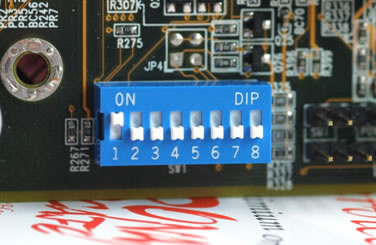 Image 3-1
|
|
|
28.
|
The picture in 3-1 represents
a. | BIOS | c. | DIP Switches | b. | Jumpers | d. | Commands |
|
|
|
29.
|
In the image in 3-1, the first switch represents the binary digit
|
|
|
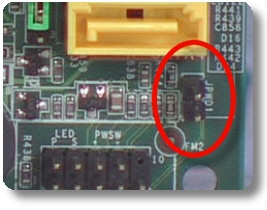 Image 3-2
|
|
|
30.
|
The picture in 3-2 represents
a. | BIOS | c. | DIP Switches | b. | Jumpers | d. | Commands |
|
|
|
31.
|
____ are numbers assigned to hardware devices that software uses to get the
devices' attention and to interact with them.
a. | Memory addresses | b. | I/O addresses | c. | IRQ's | d. | DMA channels |
|
|
|
32.
|
The DOS command to format a disk and make it bootable is ____.
a. | FDISK | b. | FORMAT A: /U | c. | SYS
C: | d. | FORMAT A: /S |
|
|
|
33.
|
In Windows 9x, the file MSDOS.SYS is a ____ file that contains parameters to
customize the boot.
a. | binary | b. | hexadecimal | c. | text | d. | Microsoft WORD |
|
|
|
34.
|
The two most popular output devices are ____ and ____.
a. | keyboard, mouse | b. | monitor, mouse | c. | keyboard,
printer | d. | monitor, printer |
|
|
|
35.
|
Under DOS, a filename can be up to ____ characters and a file extension can be
up to ____ characters in length.
|
Completion
Complete each
statement.
|
|
|
36.
|
Communication of instructions and data by the devices that process them is
always in ____________________.
|
|
|
37.
|
Another name for temporary storage is ____________________ storage.
|
|
|
38.
|
_________ can cause the user to experience annoying popups
and advertisements. It will often work in conjunction with spyware to focus advertisements based on
user profiles.
|
|
|
39.
|
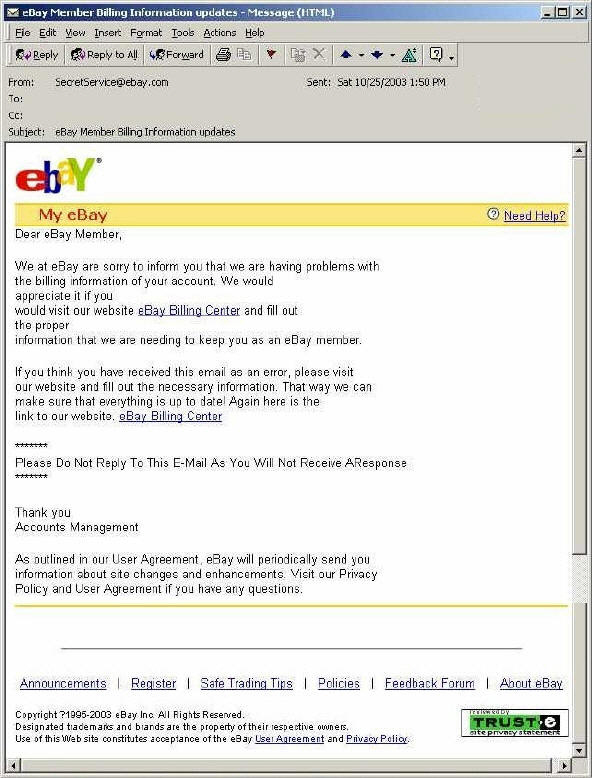 can be an example of
_____________ can be an example of
_____________
|
|
|
40.
|
All power ____________________ originate from the power supply.
|
|
|
41.
|
The Microsoft ___ ___ has answers to just about any question you might ever have
about Microsoft Products.
|
|
|
42.
|
A computer ____ is a piece of software that can wreak havoc
on a computer system by attaching itself to other files in order to gain entry to the computer
system.
|
Matching
|
|
|
Match the command to the result.
a. | c:\>format
a:/s | b. | a:\c: | c. | c:\windows>cd\ | d. | c:\>copy
autoexec.bat a: | e. | c:\edit autoexec.bat |
|
|
|
43.
|
Erase all the files on a floppy disk and place system files on it
|
|
|
44.
|
change the directory to the root directory
|
|
|
45.
|
move from the A:\ drive to the C:\ drive
|
|
|
Match the Windows 98 system file with its description.
a. | WIN.INI | f. | MSDOS.SYS | b. | IO.SYS | g. | EXPLORER.EXE | c. | DETLOG.TXT | h. | SYSTEM.INI | d. | WIN.COM | i. | COMMAND.COM | e. | SYSTEM.DAT |
|
|
|
46.
|
Windows 98 shell
|
|
|
47.
|
File that contains information for initializing the system
|
|
|
48.
|
The registry
|
|
|
49.
|
File where all the customized settings are stored
|
|
|
50.
|
Boot configuration
|
|
|
51.
|
Has a list of all hardware detected
|
|
|
52.
|
Real mode operating system and system detection
|
|
|
53.
|
Real mode stub that’s used to start Windows 98
|
|
|
54.
|
Contains a list of commands for command line processing
|
|
|
Match the kind of virus to its description a. | malware | g. | file
viruses | b. | adware | h. | boot
sector | c. | spyware | i. | backdoor trojans | d. | trojan | j. | page hijackers | e. | worm | k. | phishing | f. | macro viruses |
|
|
|
55.
|
use commands (macros) embedded in other software to infect and spread to other
files viewed by that software. E.g. Word and Excel have macros and macro viruses can spread by
exploiting these commands
|
|
|
56.
|
duplicate themselves and use communications such as email to spread. They can
look at your email address book and send themselves to users in your address book.
|
|
|
57.
|
attach themselves to other software. When the software is run, the virus first
loads itself into memory so that in can further infect other files or begin damaging the
computer.
|
|
|
58.
|
programs that claim to perform a particular function but in fact do something
different. E.g. they could infect your computer with a virus or erase your files.
|
|
|
59.
|
programs that allow other computer users to remotely control your computer via
a local area network or the Internet.
|
|
|
60.
|
an older type of virus and not so common. They used to infect a computer's
startup program so that the virus would become active as soon as the computer started up.
|
|
|
61.
|
can profile your online surfing and online shopping habits and or placing
annoying pop-up adverts, installing additional IE menu helper bar
|
|
|
62.
|
often collects user details, such as software installed and often sensitive
information such as passwords and even credit card details which are then sent to via the internet to
a central collection point.
|
|
|
63.
|
applications that redirect links to specific web pages, such as a request to go
to a search engine for example, and instead redirect the web browser to a designated address, related
to the initial link but often containing advertising or adware.
|
|
|
64.
|
The act of sending an e-mail to a user falsely claiming to be an established
legitimate enterprise in an attempt to scam the user into surrendering private information that will
be used for identity theft. The e-mail directs the user to visit a Web site where they are asked to
update personal information, such as passwords and credit card, social security, and bank account
numbers, that the legitimate organization already has.
|
|
|
Match the job to the Windows configuration file
a. | SYSTEM.INI | b. | PROGMAN.INI | c. | WIN.INI | d. | CONTROL.INI | e. | MOUSE.INI | f. | WINDOWS.INI | g. | IGUANA.INI |
|
|
|
65.
|
contains hardware settings and multitasking options for Windows
|
|
|
66.
|
contains desktop information
|
|
|
67.
|
contains settings for the input device
|
|
|
68.
|
contains informaition about settings made by applications
|
|
|
Fill in the blanks for the Windows 98 boot process
a. | First BIOS runs ___________. | b. | Second BIOS loads a small ______
core | c. | Third this core loads ___________ |
|
|
|
69.
|
DOS
|
|
|
70.
|
POST
|
|
|
71.
|
Windows 98
|
|
|
Match the IRQs to their common devices
a. | 0 | i. | 8 | b. | 1 | j. | 9 | c. | 2 | k. | 10 | d. | 3 | l. | 11 | e. | 4 | m. | 12 | f. | 5 | n. | 13 | g. | 6 | o. | 14 | h. | 7 | p. | 15 |
|
|
|
72.
|
Real time clock
|
|
|
73.
|
System timer/clock
|
|
|
74.
|
Primary IDE channel
|
|
|
75.
|
PS/2 Mouse
|
|
|
76.
|
Keyboard
|
|
|
77.
|
Math coprocessor
|
|
|
78.
|
COM 2 or 4
|
|
|
79.
|
Parallel port (LPT1)
|
|
|
80.
|
Cascades to 2
|
|
|
81.
|
Floppy controller
|
|
|
82.
|
COM 1 or 3
|
|
|
83.
|
Physically wired to 9 to allow the second set of IRQs to work
|