How
Hardware and Software Work Together
Sno
Isle Skill Center
Tory
Klementsen, MCP A+
In this unit you will learn
•
What happens
between hardware and software when you first turn on a computer.
•
How hardware
interacts with the system.
•
How software
supports hardware.
•
Practical and
easy ways to protect your computer.*
Hardware and Software Interaction: An
Overview
•
Software
– ______________________ of the computer
• Determines what ______________________is present
• Decides how hardware is ______________________and used
• Uses hardware to perform ______________________
– Consists of programs that ______________________computers
to perform specific tasks*
Categories of PC Software
•
______________________
(basic input/output system) and device drivers
•
Operating system
(OS)
•
______________________software*
Operating System (OS)
•
Software that ______________________a
computer
– Manages ______________________
– Runs ______________________
– Provides ______________________ ______________________
– ______________________, ______________________, and ______________________files
•
Communicates with
hardware using ______________________
______________________; uses BIOS or device drivers for interface to
system resources*
Operating System (OS)
•
Works with system
BIOS and device ______________________to provide instructions to hardware to
perform tasks
•
Acts as a liaison
between the user and the hardware through the use of drivers
•
Provides user
interface
– ______________________
– ____________________________________________
– ______________________*
BIOS and Device Drivers
•
Categories of
BIOS (firmware) programs
– ______________________BIOS
– ______________________BIOS
– CMOS ______________________
•
Device drivers
– Small programs stored on hard drive that tell computer
how to communicate with an ______________________/______________________device
– Necessary for communication between OS and more
complex ______________________
– Some are built into the OS (______________________,
basic mouse)*
DIP Switches and Jumpers
•
DIP switches were
used to set ______________________and other settings now done in BIOS with PnP
•
Jumpers do the
same.
•
On is _____, off
is __________
•
In a jumper a _________________ is
_________________ (1) or ___________________ (0)*
System Resources
•
When a piece of
hardware is installed, it is assigned specific system _________________
•
It allows the _________________ to communicate with the _________________ and with _________________
– Memory _________________
– _________________
addresses
– _________________
request numbers (IRQs)
– Direct _________________ access (DMA) channels
•
All four types
depend on certain lines on a bus on the motherboard*
First part of Chapter Review (Answer
these here)
•
This is the
intelligence of the Computer.
•
What are the
three things software does for your computer?
•
What are the
three kinds of software?
•
This manages
hardware, runs applications, and provides a way for the user to talk to the
computer.
•
What are the
three categories of BIOS present in a computer?
•
I must install
one of these with each piece of hardware.
System Resources
•
IRQ—A line that
allows a device to signal the _________________
that it needs attention.
– Some lines have _________________ priority
– Each line has a number _________________ assigned to it
•
I/O
Addresses—numbers assigned to _________________
devices that _________________ uses
to talk to it. Each device “_________________
” on those numbers and responds when it gets a message.
•
Some devices use
polling—_________________ , for
example.*
System Resources
•
Memory
Addresses—Numbers assigned to physical memory either in _________________ or _________________ .
•
DMA channel—A
channel assigned to some hardware allowing it to communicate directly with _________________ without bugging the CPU.*
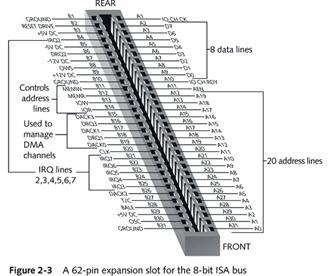
The 8-bit and 16-bit ISA Slots
•
8-bit ISA bus had
a limited number of system resources available to it
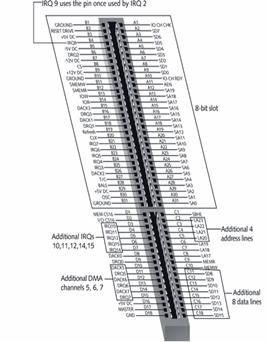
•
Number was
increased with invention of 16-bit ISA bus
•
When you look at
the pictures on the next few slides, notice how each pin in the slot
corresponds to a specific trace and therefore a specific “job”.
|
|
|
•
Comparing 8 bit
to 16 bit
– Which would have more capabilities?
– Which would be faster?
– Which might be more prone to errors?
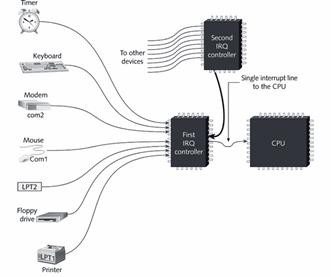
Common Uses for Some IRQs
8-bit
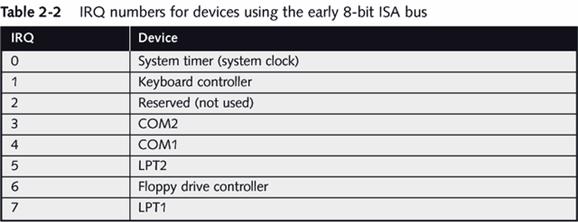
IRQs on a 16-bit system
Why IRQs
•
Preconfigured
assignments make it easier to configure devices and avoid conflicts with other
devices
– COM1 and COM2 (for serial devices such as modems)
– LPT1 and LPT2 (for parallel devices such as printers)*
IRQ Sharing
•
Because there are
only _________________ physical IRQs,
new Operating Systems use IRQ sharing
•
_________________ Cards use IRQ sharing through IRQ _________________
– More than one device can share the IRQ
– Can cause some conflicts, but the OS usually irons it
out
•
Sharing is not
possible with _________________ devices
•
That’s why you
have _________________ IRQ numbers than
the actual number of lines!*
Memory Addresses
•
_________________ numbers, often written in segment/offset
form, assigned to RAM and ROM so that the CPU can access both
•
It works like a
seat in a theater. Each device is assigned a specific place to put it’s “stuff”
in RAM or ROM
•
Older 16-bit
drivers required _________________ addresses,
but the new ones will take what’s given them.*
How Memory Addresses Are Assigned
•
CPU has _________________ number of memory addresses, determined by CPU
and bus it is using
•
They can be
assigned to any type of _________________
memory in the system that needs to be addressed by the CPU
•
Once addresses
have been assigned (usually during boot process), CPU sees physical memory as a
single list that can be accessed using _________________ _________________ *
How Memory Addresses Are Assigned in
DOS/Win9x
Shadowing ROM
•
Process of
copying programs from _________________ to
_________________ for execution
•
The first memory
addresses will be taken by the _________________
•
This way the
computer doesn’t have to access the ROM chip, it can find all it needs in RAM.*
I/O Addresses
•
Numbers the CPU
can use to access hardware devices, in same way it uses memory addresses to
access physical memory
•
Also called port _________________ or _________________ *
Common Assignments for I/O Addresses DMA
Channels
•
Provide shortcuts
for a device to send data directly to _________________ ; bypasses CPU
•
A chip on the
motherboard contains _________________ logic
and manages the process
•
Each channel
requires two lines to manage it
– One for DMA controller to request _________________ from CPU
– One used by _________________ to acknowledge that DMA controller is free to
send data over data lines without interference from CPU
•
If more than one
device wants to use the same channel, there is a DMA conflict.*
DMA Channels
Tools for Examining Your System
•
_________________ Manager
– Properties of “My Computer”, click hardware, click
device manager
•
System
Information
– In the run command type msinfo32.exe
•
_________________ _________________ _________________
– Used in Windows 9x/ME
– Type MSD.EXE at the command prompt
•
Let’s try one!
Log into the aa account and open the device manager.
Review (answer on here)
•
What four
resources are assigned to hardware devices?
•
Of those four,
which one is only sometimes assigned
•
How many IRQs are
there on an 8-bit system?
•
How did they
enable 8 more IRQs on a 16-bit system?
•
IRQ ______ is
used in 32-bit systems so you don’t run out of IRQs
•
Only ____ buses
can use IRQ sharing (aka steering)
•
How many DMA
channels are there?
•
What is the
purpose of a DMA?
•
Which resource
allows software to talk to a device and vice versa?
•
How many lines of
a DMA channel are used?
•
Which IRQ is used
to enable IRQ sharing?
•
Which DMA is not
available?
•
Which IRQ is not
available?
•
Why?
•
This is the
address assigned to a piece of hardware that the CPU uses to talk back
•
This is assigned
to some devices so they don’t have the bug the CPU when they need to use RAM
•
This is the area
of RAM a device can use to store stuff.
|
0 |
|
8 |
|
|
1 |
|
9 |
|
|
2 |
|
10 |
|
|
3 |
|
11 |
|
|
4 |
|
12 |
|
|
5 |
|
13 |
|
|
6 |
|
14 |
|
|
7 |
|
15 |
|
o
Which has a
higher priority, IRQ 3 or 9?
•
What is ROM
shadowing?
Booting up Your Computer
•
Refers to the
computer bringing itself up to an _________________ state without user intervention
•
_________________ boot (_________________ boot)
– Involves initially turning on _________________ with on/off switch
– More _________________
than soft boot because of initial _________________ surge through equipment
•
Soft boot (warm
boot)
– Uses _________________
to reboot
– Faster than _________________ boot*
Plug and Play (PnP) Standard
•
Makes installing
hardware _________________ less
complicated
•
Rather than
having to reset _________________ switches
and jumpers, OS and/or startup BIOS automatically configures hardware devices
to reduce or eliminate conflicting requests for system resources
•
Applies to OS, BIOS
on the motherboard, and BIOS on devices*
Functions Performed
During the Boot
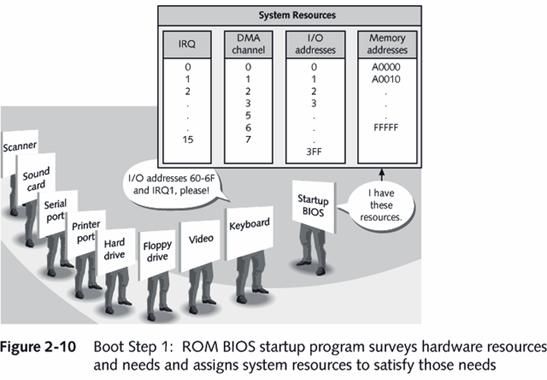
1. Startup _________________ tests _________________ hardware components (power-on self test or
POST)
2. Setup information is used to configure both _________________ and _________________
3. Hardware components are assigned _________________ _________________ they will later use for communication
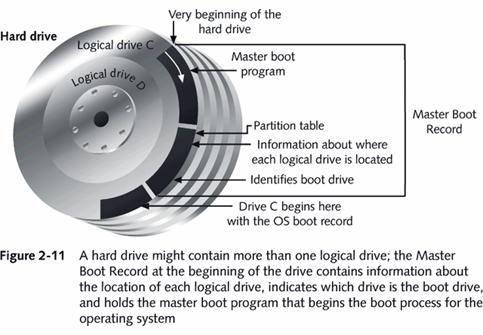
4. Startup _________________ finds the _________________ , which is loaded, configured, and executed
5. _________________ devices are matched up with the _________________ and device _________________ that control them
6. Some _________________
software may be loaded and executed
Startup BIOS Controls the Beginning of
the Boot
•
Startup BOS is in
control for first three steps and beginning of the fourth, where control is
turned over to the OS*
Parts of the Boot Process
•
Step 1: _________________
•
Step 2: _________________ BIOS startup program searches for and loads
an OS
•
Step 3: _________________ configures the system and completes its own
loading
•
Step 4: _________________ executes application software
Boot Step 1
How BIOS Finds/Loads the OS
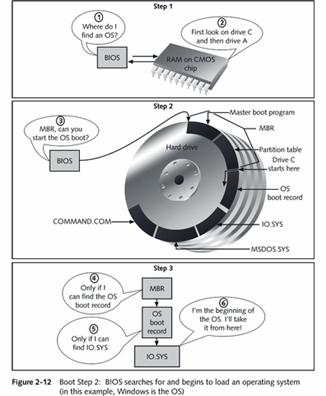
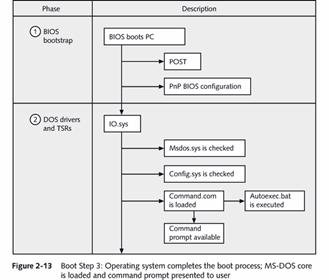
Boot Step 3