LAB 2-5 Resource Manipulation
Objective
_ List examples
of standard IRQ and DMA usage.
_ Explain how to
determine which IRQ and DMA channels and addresses are being utilized.
_ Explain how to
modify IRQ and DMA address settings to resolve resource conflicts.
ACTIVITY
Recording your
lab workstation’s IRQ settings
- Start your lab workstation, open
Windows XP.
- Click the Start button.
- Point to Settings.
- Click Control Panel.
- Double-click the System icon.
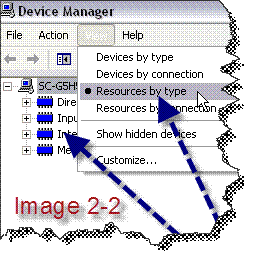
- Click the Device Manager tab, then
click ViewàResources by type as
shown in Figure 2-2.
- Click Interrupt Request
- Record the device name for each of the
following IRQs:
|
IRQ 00 |
|
IRQ 01 |
|
IRQ 02 |
|
IRQ 03 |
|
IRQ 04 |
|
IRQ 05 |
|
IRQ 06 |
|
IRQ 07 |
|
IRQ 08 |
|
IRQ 09 |
|
IRQ 10 |
|
IRQ 11 |
|
IRQ 12 |
|
IRQ 13 |
|
IRQ 14 |
|
IRQ 15 |
Recording your lab workstation’s DMA settings
- Start your lab workstation, and allow
it to boot into Windows 9x.
- Click the Start button.
- Point to Settings.
- Click Control Panel.
- Double-click the System icon.
- Click the Device Manager tab.
- Click viewàResource by type.
- Click the Direct Memory Access (DMA)
option button.
- Record the device name for each of the
following DMA channels:
|
DMA 01 |
|
DMA 02 |
|
DMA 03 |
|
DMA 04 |
Windows 7
- Open 7.
- Right click on My Computer and select manage.
- You are now in System Tools. Nifty,
huh? Select Device Manager.
- View devices by resources.
- Click on IRQ
- Fill out the table below
|
IRQ |
Device |
|
|
|
|
|
|
|
|
|
|
|
|
|
|
|
|
|
|
|
|
|
|
|
|
|
|
|
|
|
|
|
|
|
|
|
|
|
|
|
|
|
|
|
|
|
|
|
|
Viewing Device Resources by
Device
- ViewàDevices by type.
- Find your Network Adapter.
- Right clickàProperties
- What resources are assigned to this
device?
- Why does it NOT have DMA assigned?
- What two things (probably, maybe 3) do
have DMAs assigned?
Note: For the A+
Certification you should know:
1.
IRQs
2.
What I/O addresses are
3.
What might be assigned a DMA.
4.
What resources can be assigned (all four)
5.
What memory addresses are.
6.
More than one way to get to device manager. List the two ways you know
to get to device manager in Windows XP