|
Company
Name |
|
|||
|
Employee
Names |
|
|||
|
Team
Lead |
|
|||
|
Module
Name |
Windows Server Network Administration |
|||
|
Certification
Test |
|
Vendor |
|
|
|
Objectives
covered |
|
|||
|
Time
allotted |
8 Days |
Time
Taken |
|
|
|
Date
Started |
|
Date
Completed |
|
|
Portfolio Contents
|
Item |
Lab
completed |
Lab
report |
Incomplete |
|
Lab 6-1 |
|
|
|
|
Lab 6-2 |
|
|
|
|
Lab 6-3 |
|
|
|
|
Lab 6-4 |
|
|
|
|
Lab 6-5 |
|
|
|
|
Lab 6-6 |
|
|
|
|
Lab 6-7 |
|
|
|
|
Lab 6-8 |
|
|
|
|
Lab 6-9 |
|
|
|
|
Lab 6-10 |
|
|
|
|
Lab 6-11 |
|
|
|
|
Lab 6-12 |
|
|
|
|
|
Worth |
Awarded |
Incomplete |
|
Windows Server 2003
Family |
|
|
|
|
|
|
|
|
|
Completed solution to problem portfolio (Extra Credit) |
|||
|
:
Customer Overview |
|
|
|
|
:
Identify Customer Needs |
|
|
|
|
:
Identify Possible Solutions |
|
|
|
|
:
Define terminology used (jargon, technical terms) |
|
|
|
|
:
Price Out Solutions |
|
|
|
|
:
Diagram of Solutions |
|
|
|
|
Budget for Unit |
500 |
|
|
|
Expenditures |
|
Remaining Budget |
|
|
Tardies
(5/day) |
|
Labs |
N/A |
|
Absences
(10/day) |
|
Hardware
Test Score Average |
N/A |
|
Off Task
(50/student/day) |
|
Objective
Test Score Average (100) |
|
|
Consultation
Fees (50/consultation) |
|
Project
(400) |
|
|
Seminar
(100) |
|
Total
(500) |
|
|
Missed
deadline (100/day) |
|
|
|
|
Total |
|
|
|
|
Budget
remaining |
|
|
|
Network Administration Overview
Some
of the tasks of a Network administrator
nInstalling
and maintaining the _________________ system
nAdministering
_________________Directory
nAdministering
file & _________________resources*
Administering
Active Directory
n_________________objects
n_________________objects
n_________________objects
nManaging
Active Directory _________________and object _________________
n_________________ _________________objects*
Active
Directory
nActive
Directory is a _________________ service.
nInformation about _________________ and _________________
nA service that lets you _________________ and _________________ those resources
nAD
is built around the _________________
_________________ _________________ (DNS) and the _________________ _________________ _________________ _________________ (LDAP). These are used to locate and access
any type of resource on the network and are supported by UNIX, Mac, Linux,
Windows, etc.
nActive
directory is installed only on authentication servers.
nWeb servers, file servers, etc. do not need Active
Directory, although they will use _________________ .
AD
World
nA
client wants to access a service or _________________ , it does so using the resource’s AD name.
nA DNS _________________ is sent to the DNS server using the AD name.
nThe DNS server provides the _________________ address of the domain controller responsible
for the name (i.e. I’m trying to use folders on DFS. DFS is on Nettech-04. I
don’t need to know that as long as AD knows that.)
nClient receives the DC’s address and uses it to make
an _________________ query. LDAP finds
the address of the system.
nThe DC response with the requested information.
nThe client _________________ the information.
nThe client uses the _________________ , standards, and _________________ IF they have permission to do so!*
Once
AD is installed
nAdd
_________________
nAdd
_________________
nAdd
_________________ units
nAdd
_________________ accounts
nJoin a domain from the computers in your network
n_________________ folders
n_________________ printers
nControl
user _________________
Exploring
Active Directory Users and Computers
nActive
Directory Users and Computers
nMMC application with the filename of _________________
nPrimary _________________ tool used to manage the following within an
Active Directory domain
Exploring
Active Directory Users and Computers
nUse
it to control
n
_________________
n
_________________
nOUs
n_________________ information
nOne of the tools used to create and manage Group
Policy objects
Creating
Organizational Units
nOrganizational
unit (OU)
nA _________________
container that contains other objects, such as
nUsers
nGroups
nComputers
nPublished resources
nOther OUs
nCan only consist of _________________ from its _________________ domain
Creating
Organizational Units
nMain
reasons to create an OU
n_________________
and _________________ a single
domain into logical administrative units
nAllow some _________________ of _________________ over different departments
nGive different people in a company different
n_________________ Policies
n_________________
n_________________
Creating
New User Accounts
nUser
account object
nRepresents all the information that defines a _________________ user with _________________ permissions to the network
Creating
New User Accounts
nWhy have user accounts?
nRequire _________________ of anyone connecting to network
nControl access to network resources
such as shared _________________ or _________________
n_________________ access to resources by _________________ actions performed by a user logged on with a
specific account
Creating
New User Accounts (Continued)
nBefore
creating your users, decide:
nA _________________
convention
nWhat will _________________ look like
nTory_klementsen
nKlementsent
nTeechur
nControlling _________________ ownership
nCan users _________________ it?
nHow _________________ ?
nIncluding additional required attributes
Creating
New User Accounts (Continued)
nA
number of initial account settings can be configured when creating a user
account, such as
nWhether a user’s password ever _________________
nIf the account should initially be _________________
nUser can’t _________________ password
nPassword never _________________
nOnce
a user account is created, a number of additional tasks and attributes can be
applied, such as:
nCopy
nAdd to a _________________
n_________________
Account
n_________________
Password
n_________________
(to another organizational unit)
nOpen Home Page
n_________________
Mail
nProperties
nTo
view and modify user account attributes
nRight-click the user account, then
nClick _________________
Creating
New User Accounts (Continued)
nProperties
dialog box of a user account
nTabs allow you to
nAdd specific information, or
nEnable specific _________________ for the user account
Properties of a user account
object
nCreate
a new user, Chicken Little
nGive
him an address
nOn
the account tab, set his account to expire on next Friday
nSet
his homefolder to be \\nameofyourserver\home$\%username%
nSet
his profile path to be \\nameofyourserver\home$\profiles\%username%
nGive
him a phone number or three
nHis
Title is Head Chicken
nDepartment
Homeland Security
nCompany
US
nMake
YOU his manager (you do have an account, right?)
nClick
Member Of and make him a member of the administrators group
Creating
Computer Accounts
n_________________ account
nAn Active _________________ object
nCan be created in three _________________ ways:
nDuring initial _________________ of client operating system you can have it
automatically join the domain
nWhen you join the domain, you
provide _________________ credentials and it creates the account
n_________________
in Active
Directory before client installation
Moving
Active Directory Objects
nObjects
created within the Active Directory Users and Computers console can be moved
between _________________ within the same domain
nCreate
an OU named Chickens
nMove
Chicken Little into that OU
Creating
Group Objects
nWindows Server
2003 groups
nIt is considered a _________________ object
nUsed to organize collection of _________________ , _________________ , _________________ , or other _________________ into a single
security principal
nSimplifies _________________
nRights
and resource permissions can be assigned to a _________________ rather than to individual users
nGroups
and OUs
nSimilarity
nBoth are used to _________________
other objects
into logical containers
nDifferences
n_________________
and _________________
nOUs are not _________________ principals and as such
cannot be used to define permissions on _________________ or be assigned rights
nActive Directory security groups are security
principals that can be assigned both _________________ and _________________
nObjects that they can contain
nOUs can only contain objects from their _________________ domain
nSome _________________ can contain objects from _________________ domain within the forest
Group
Types
nWindows
Server 2003 allows two group types:
nSecurity group
nDefined by _________________
Identifier (SID)
nCan be listed in _________________
access control
lists (_________________ ) used to define permissions on resources and objects
Group
Types
n_________________ group
nUsed solely for e-_________________
distribution
nDoes not have _________________
SID
nCannot be listed in _________________
used to define
permissions on resources and objects
Group
Scopes
nGroup
scope
nThe logical boundary within which a group can be
assigned _________________ to a specific resource within the domain or forest
Group
Scopes
nSecurity
and distribution groups in Active Directory can be assigned one of three
possible scopes
n
_________________
n_________________ local
_________________
Global
nA
global group
nCan be assigned permissions to any resource in _________________ domain within
the _________________
nCan only contain _________________ of the _________________ domain in
which it is created
nMainly used to organize user objects into logical
groupings according to function
Domain
Local
nA
domain local group
nCan only be assigned _________________ to a resource
available in the _________________
domain in which it is created
nGroup membership can come from _________________ domain within
the forest
nMainly used to assign access _________________ to a resource
Universal
nA
universal group
nCan be assigned permissions to _________________ resource in _________________ domain within
the forest
Differences between universal and global groups
nA universal group can consist of user objects
from _________________ domain in the forest; global groups can only
consist of user objects from the _________________ domain
nUniversal groups are only available when a domain is configured in Windows 2000 _________________ mode or the
Windows Server 2003 _________________
level
Creating
Group Objects
nSteps
to create group objects in Active Directory
nDecide in which _________________ _________________ the group
should be created
nChoose an appropriate group _________________ , _________________ , and type
nTo
create universal groups
nA domain must be switched to _________________ mode
Modifying
Group Memberships
nMembership
can be added once a group object is created
nDepending
upon which type of group is created, Windows Server 2003 groups can possibly
contain
n
_________________
n
_________________
n
_________________
n_________________
Changing
a Group Scope
nA
group can change its scope as long as group’s membership _________________ are not
violated
nIn other
words, since a local group cannot contain local groups, if you have a global
group with local groups in it, you have to remove the local groups before you
turn it into a local group.
Changing
a Group Scope
nRules
for changing group scopes
nYou can only change a global group to a universal
group as long as it is not a member of another _________________ group (because
global groups can’t contain universal groups)
nYou can only change a domain local group to a
universal group as long as it does not contain any other _________________ _________________ groups as a
member (because global groups cannot contain domain local groups)
Understanding
the Built-in Local Groups
nBuilt-in
local security groups
nHave various _________________ rights
nCan be used to allow users to perform certain _________________ tasks
nEase the implementation of _________________ and _________________ rights
throughout the network
nFound in _________________ container
nBuilt-in
global groups
nFound in _________________ container
Managing
Security Groups
n
Acronym A G U DL
P can be used to implement the use of security groups
–
Create user A_________________ , and organize
them within G_________________ groups
– Often users are grouped in global
groups based on departments in the organization
Managing
Security Groups
–
Optional: Create U_________________ groups and
place global groups from any domain within the universal groups
Managing
Security Groups (Continued)
n
Create D_________________ L_________________ groups that represent the resources in which
you want to control access and add the global or universal groups to the domain
local groups
n
Assign P_________________ to the domain local groups
Domains,
Trees, and Forests
nDomain
nDomains are a collection of computers _________________ together with
at least one server authenticates users and controls access.
nIn a domain all computers share the same _________________ :
nChicken.com
nServer01.chicken.com
nComputer04.chicken.com
nwww.chicken.com
nThese are _________________
_________________
_________________
_________________ and can be used to access the
computers (resolved through DNS)*
Domain
Domain
Tree
nCollection
of domains
nAll _________________ share the same
_________________
nThe root _________________ holds the main
_________________ (pickle.com)
nThe _________________ domains are
“under” the _________________ domain
nSweet.pickle.com
nGherkin.pickle.com
nDill.pickle.com
Forest
nA
_________________ is also a collection of domains; however:
nDomains do not share the same _________________
nJoin _________________ to create a
forest
nSpecifically for sharing resources among _________________ domains
Forest
nTrusts
nIn both _________________ and _________________ trusts are
created
nOne-way: one domain trusts _________________ , but not vice
versa
nFox.com trusts chicken.com.
Chicken.com does not trust fox.com
nTransitive: _________________ domains trust
each other
nChicken.com trusts fox.com
nFox.com trusts chicken.com
Administering
Permissions in Active Directory
nActive
Directory uses permissions to protect the creation, deletion, or viewing of
objects within the database
Administering
Permissions in Active Directory
nBy
default, administrators have _________________ _________________ to all objects
within the domain
nUsers
are given the initial permission to read most _________________ of the objects
stored in the database
Active
Directory Object Permissions
nActive
Directory objects can be assigned permissions at two levels:
n_________________ -level
permissions
nDefine which types of objects a user
or group can view, create, delete, or modify within Active Directory
nCan be applied according to a _________________
set of _________________
permissions
Active
Directory Object Permissions
n_________________ -level
permissions
nDefine which attributes of a certain
object a user or group can _________________ or _________________ within Active Directory
Permission
Inheritance
nBy
default, all _________________ objects inside a container object inherit permissions
from _________________ objects
Permission
Inheritance
nPermission
inheritance and careful planning can eliminate the need to assign permissions
to
n_________________ container
object, or
nEvery object _________________ a container
nThe
default inheritance of permissions can be modified by _________________ the
inheritance at a container or object level
Delegating
Authority Over Active Directory Objects
nSteps
to delegate the administration of Active Directory
nDesign OU structure so that the administration work
can be _________________
n_________________ the
appropriate level of _________________
permissions for each administrator
Delegating
Authority Over Active Directory Objects
n_________________ of _________________ Wizard
nGuides you through the process of determining the
permissions that you want to delegate
nConfigures permissions for the object and child
objects
Delegating
an administrative task in Active Directory
Windows 2003 Server Family
Go to the website and
read through the articles on Windows 2003 Server Editions. When you have
finished, complete the scenarios below by selecting the member of the family
that will best fit the customers’ needs.
This page will give you
an overview of each server type, but you may need to look up a little more information
on some of them to truly understand when to use them.
After that, take the
quiz 1-5 on the Windows 2003 Server Family.
|
Scenario 1: A small
business is setting up its first domain. Up to this point they have had a
peer-to-peer network set up. As they’ve grown, however, managing the p2p
network has become unwieldy and the security of documents has become a major
issue. They would like one server that can authenticate users, hold files,
share resources among users, and run a website. Describe the version
of Windows Server 2003 you would choose for their setup and why you would
choose this version. |
|
|
|
Scenario 2: TyCorp has
a large enterprise domain set up using Netware. They have decided to expand
into ecommerce. They have hired an ecommerce specialist who plans to set up
the web-related servers separate of the main network and would like to use a
Windows server. This server will host a major website that uses php, asp,
.NET, and SQL. Describe the version
of Windows Server 2003 you would choose for this setup, and why you would
choose this version. |
|
|
|
Scenario 3: Pumpkin
Pete’s has just acquired Rock Enterprises in a hostile takeover, effectively
doubling the size of their business. The days of “getting by” with their
current network are over over over! They need to set up an enterprise domain.
Since the takeover included a pretty good amount of capital and new computer
systems, they want to set up a tight, robust, business network that can
support current needs, the needs of the growing infrastructure, and future
needs. Rock Enterprises had a large ecommerce program that was hosted by a
second party company that they would like to move in-house. They are
interested in high availability, server clustering, and high security. In
addition, they would like to use smart cards and biotechnology for
authentication. Describe the version
of Windows Server 2003 you would choose for Pumpkin Pete’s and tell me why
you would choose this setup. |
|
|
|
Scenario 4: Whidbey
Whippets is expanding their company. They currently have one server that
manages all of their resources. They have just purchased a second server with
a eight (yes 8) processors and would like to install one of the Windows 2003
Server operating systems that will run on a this monster. They would also
like to use clustering for the six servers they have in place already. They
don’t have the needs for a database and don’t see that in their future. Which one would you
choose for their needs? |
|
|
|
Server
Type |
Processors
Supported |
Clustering
Support (yes/no
how many) |
General
purpose and other notes |
|
Windows 2003 Server |
|
|
|
|
Windows 2003 |
|
|
|
|
Windows 2003 Server
Datacenter Edition |
|
|
|
|
Windows 2003 Server
Web Edition |
|
|
|
|
Longhorn |
|
|
|
|
Windows 2003 Server
Datacenter Edition 64 bit version |
|
|
|
Lab 6-1 Using Active
Directory Users and Computers
- Log into your server.
- Click start and go into Administrative
Tools. Can’t see them? Right click on the taskbar and select properties.
Tell it to show the administrative tools They should be showing on a
server, but you never can tell.
- Open Active Directory Users and Computers.
- You should see something that looks like
this:
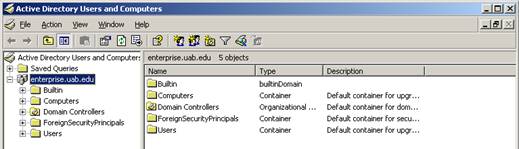
Create
a new user for yourself.
- Right click on the server name and
select “New—User”.
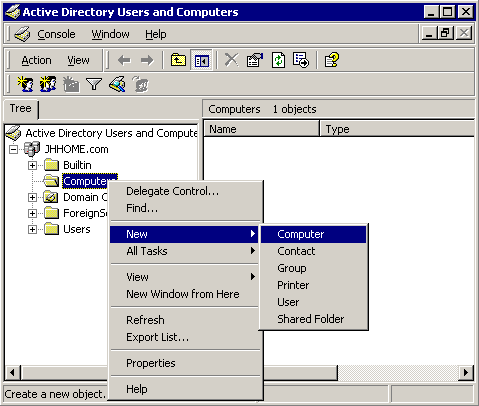
- Enter your information.
- Give yourself a username.
- Click on the “Member of” tab and select
groups.
- Add yourself to the Administrators group.
Create
a new user from a template
- Create an administrative user for me! Right
click on your user your just created and select copy.
- Create a user with my name, Tory O.
Klementsen and username teechur, password P@ss1.
- Have me not have to change the password.
- Set it so the password never changes.
Change
user properties
- Double click on your username or right
click and select properties.
- Put in your address, set me as your
manager, make up a phone number and all that stuff. It all gets published
in a directory. How cool is that? Put yourself in a department in a
company.
Set
up a home directory
- Go into your root directory (probably your
C: drive) and create a folder named users.
- Share this folder with the sharename users.
- Go back into Active Directory Users and
Computers. Double click on your account. Select the profile tab. You’ll
see something like this:
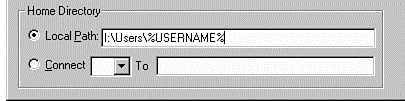
- Click on Connect. The default drive letter
is z:\, leave that. In the to: box type \\nameofyourserver\users\%username%.
The %username% is a wildcard used in Active Directory. When you hit apply
you should not get a message (if you do, you did something wrong so try
again). But what will happen is a folder will be created in that shared
folder named users with the name of your user. That user will be set as
the “owner” of the folder and he/she will be given full control. When he
logs onto his workstation, the server will send a command to map a network
drive to z:\. All files saved into z:\ will be available to this user no
matter where he logs on in the network! It’s pretty cool. In fact, later
you can set a policy that will map the My Documents folder to z:\ for your
users so that any time something is saved in My Documents the server will
snag a copy, put it on the server, and the user will have a copy on their
home computer and the server.
- Check the Users directory to make sure a
folder was created for your user.
Poke
Around Active Directory
- Click the Builtin container and
write down the list of built in users already available in Active
Directory.
|
|
|
|
|
|
|
|
|
|
|
|
|
|
|
|
- Poke around Computers. What computer
accounts are set up?
- In AD every computer that is joined to the
domain has an account created. You can create them before joining (just
type in the name of the computer, exactly) or it’s created automatically
when you join the computer to the domain.
- Poke around Domain Controllers. What domain
controllers have accounts?
- Right click on the domain name
(at the top) and select find. Type in admin and hit return. What did you
find?
- Close Active Directory Users and
Computers. No wait, have me check you off, THEN close it! (Be sure you
answered the questions first.)
Lab 6-2 Creating an
Organizational Unit
Organizational units are
awesome. They are almost like little domains, but not. You can put users,
computers, and groups into them. You can apply policies just to those units.
You can set a specific trusted user to manage that organizational unit, without
giving them power over the entire domain.
- Open ADUandC through a new and exciting
way! Open the run command and type dsa.msc.
- Active Directory Users and Computers will
open.
- Expand your domain, if necessary.
- Right click on the domain and select newàOrganizational
Unit.
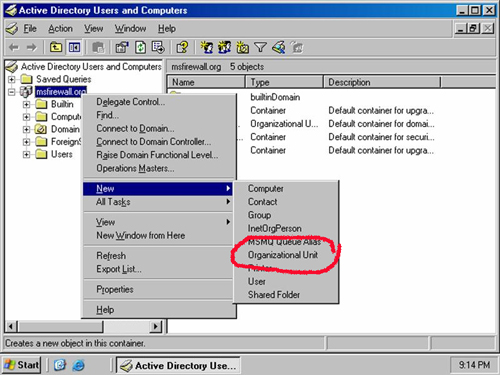
- Create an organizational unit named Star
Wars Universe.
- Notice that you’ll have some
containers (folders) already in there. Neato.
- Right click on your OU you just
created and create four new OUs; Empire, Rebels, Naboo, Tattoine.
- What containers do you see in each
new OU?
- Have me check you off. Do your lab
report. You’ve been doing lab reports, right?
Lab 6-3 Modifying User
Account Properties
- Within the sales container, create a
new user named Joe Fox. Give him username of foxj and password of 12345.
- Double click on his account.
- Click the general tab. Make Joe a
Marketing Executive.
- Put him into the Mukilteo office.
- Give him the phone number of this
classroom.
- In the email box, set his email to
foxj@nameofyourdomain.com
- Set his webpage to be
www.teechur.com
- In the address tab give him the
address of
- In the account tab click logon
hours. Joe works from 9-5 so set his logon hours from 8-6 Monday-Friday.
Do not allow him to logon on weekends.
- Don’t let him change his password.
- On the Organization tab give him the
title of VP of Sales and Marketing.
- In the Company make up a company
name.
- Set yourself as the manager by
clicking “Change” and finding your account.
- Now let’s find him!
- Right click on your domain name and
select find.
- Click the Advanced tab.
- Click the Field button. Select User.
Select Job Title. In the value text box type vp and click the Add button.
Click find now.
- Well ta da! His name should show up!
List the other properties you can search by below:
|
|
|
|
|
|
|
|
|
|
Have
me check you off. Fill out a lab report. Have an iced ay.
Lab 6-4 Creating a Computer
Account in Active Directory
- Open Active Directory Users and
Computers.
- Go into your Research OU.
- Right click on the Computers
container and select newàcomputer.
- In the NewObject-Computer dialog
box, type Workstation01 in the computer name box. Notice that the same
name will automatically show up in Computer name [pre-windows 2000] box.
Before Windows 2000 there were tighter restrictions on how you could name
a computer, so you might have to modify a computer name so that
pre-Windows 2000 computers can see that computer by name on a network.
- Create two more computer accounts
named Workstation02 and Memberserver01.
Lab 6-5 Creating a Group
Object
What is a group? There
are two kinds of groups:
8
Security
Groups—A group defined by a Security Identifier (SID) that can be listed in a
Discretionary Access Control List (DACL). A DACL is a list of users, groups,
etc. that can be assigned permissions to resources on a network. A security
group is used to control access to resources.
8
Distribution
Groups—These groups are used solely for email distribution. They do not have an
SID associated with them. They also cannot be listed in a DACL. They are used
only in email applications such as Exchange Server.
Groups also have
scopes. A scope refers to a logical boundary within which a group can be
assigned permissions to a specific resource on the domain or forest. Security
and distribution groups in AD are assigned one of three scopes; global, domain
local, or universal.
8
Global groups can be
assigned to any resource within the forest. The limitation of a global group is
that it can only contain members from the domain in which is resides. For
example, if you have a domain named sales, you cannot put Joe Blow from the
domain named Chicken into the global group you create in the sales domain.
However, you can put anyone from the Sales domain into that group. That group
can be assigned access (permissions) to resources to anything in any domain in
the forest.
8
Domain Local groups
are created on a domain controller and can only be assigned access to resources
within the domain. So for example if you create a Domain Local Group named Egg
within the Chicken.com domain, you can only assign permissions to that group
for things within chicken.com. It can’t go outside of that domain. Unlike a
global group, though, you can put users and groups from other domains into a
domain local group. Think of it this way…domain local groups are used to assign
permissions to resources within a domain to users/groups within the domain and
from other domains in the forest.
8
A universal
group can be assigned permissions to any resource on any domain within a
forest. IT’s similar to a global group, but there are differences. First, a universal
group can contain user objects from any domain in the forest (global groups can
only have users from its own domain). Second of all, universal groups are only
available when a domain is configured in Windows 2000 Native mode. That means
if any of your domain controllers are Windows NT Servers, you can’t use
Universal groups.
8
There are
also local groups, but those only work on standalone workstations to
assign permissions locally and can only contain local members. You really don’t
use them once you’re on a domain.
By
default when you install Windows Server 2003 your network will be in Windows
2000 Mixed Mode, allowing it to communicate with Windows 2000 Servers, Windows
2003 Servers, and Windows NT Primary Domain Controllers and Windows NT Backup
Domain Controllers. If you no longer have any NT in your network, changing from
mixed mode to Windows 2000 Server Native Mode will enable all of the security
features of Windows 2000. Once you are completely a Windows Server 2003
network…no 2000, no NT, you can move to Windows Server 2003 Functional level to
unlock all security features in Windows 2003. Why not just move up sooner? If
you’re using an older server on your network and move to a mode that is not
supported by that server, that server will be unable to communicate effectively
on the network.
|
Group Type |
General Use |
Windows 2000 Mixed
Mode Membership Options |
Windows 2000 Native
Mode or Windows Server 2003 Membership Options |
|
Local |
Assign permissions to
resource on a local workstation or standalone computer |
User accounts from any
domain, global groups from any domain |
User accounts from any
domain, global groups from any domain |
|
Domain local |
Assigned to resources
within local domain |
User accounts from any
domain, global groups from any domain |
User accounts, global
and universal groups from any domain; other domain local groups from the same
domain |
|
Global |
Used to organize
individual objects such as user accounts into administrative units |
User accounts only
from the domain in which the group is created |
User accounts and
other global groups from the same domain in which the group is created |
|
Universal |
Used to organize
various objects into administrative units |
N/A |
User accounts, global
and universal groups from any domain. |
- Go into Active Directory Users and
Computers.
- Right click on the Information Technology
OU and select newàgroup.
- Name the group
- Make it a global group.
- Make it a security group.
- Repeat those steps and create the following
groups: Clones, Humans, Droids, Jedi, Jedi Apprentice, Order of the Sith
Lords, Galactic Senate,
- Now create a group named Bananas and make
it a domain local group. Notice that you can tell the group’s scope and
type from the list.
Lab 6-6 Switching a Domain
to the Windows Server 2003 Functional Level
- Why could you not create universal
groups in lab 6-5?
- Open Active Directory Users and Computers.
- Right click on your domain.
- Click Raise Domain Functional Level.
- In the dialog box, click Windows Server
2003. Read the warning message. Feign concern.
- Click the Raise button.
- Click OK…you are aware this will affect the
entire domain and somehow, you don’t care. (In real life, you would care
if you still had Windows NT or Windows 2000 Domain controllers.)
- Click OK when you’re told that it was done.
Smile inwardly.
- Have me check you off.
Lab 6-7 Modifying Group Memberships
You created a bunch of
groups in lab 6-5 but so far they are empty and sad. You need to put users into
them now!
- Go into your IT OU and create five
new users:
- Darth Vader
- Queen Padme
Amadala
- Darth Sidius
- Darth Maul
- Jenga Fett
- Boba Fett
- Princess Leia
- R2D2
- C-3PO
- Qui-Gon Jin
- Obi Wan Kenobi
- Stormtrooper Joe
- Anakin Skywalker
- Luke Skywalker
- Double click the Humans global
group.
- Click the Members tab.
- Click the add button and select all
the humans in the list.
- Click OK.
- Close that group.
- Note that some people may be in more
than one group, for example:
- Luke Skywalker
- Human
- Jedi
- Rebel
- Darth Vader
- Human (kinda)
- Galactic Senate
- Galactic Republic
- Order of the Sith
Lords
- Jedi Apprentice
(at one time)
- You can revoke membership too. Put
Lord Vader in all the groups above. Now double click on the Human group
and click “Members”. Find Vader and delete his sorry behind! Do the same
for Jedi Apprentice Group. Add him into the Droid group. That will steam
his bean!
- Add everyone else to appropriate
groups.
- Create a user named Captain James
Tiberius Kirk. He can be a human. He wants to be a rebel, but he’s too bad
of an actor.
- Add yourself to whatever groups you
want.
- Add me to the Princess Group and the
Queen of All Things Group.
Lab 6-8 Changing Group
Scopes
- Open ADU&C.
- Double click the IT OU.
- Double click the Human group.
- From the general tab, click the
Universal radio button in the group scope. Why is it there now when it
wasn’t before?
- Create a new group called Trekkies.
Make it a Universal group. Click okay.
- Double click on Order of the Sith
Lords and change it from Universal to Domain Local.
- Change the group scope of another
group in your list.
Lab 6-9 Changing the
Membership of Built In Groups
Windows 2003 Server has
a number of built in groups with different permissions and pre-assigned rights.
They provide an easy way to manage specific server/network tasks and who can do
them with ease.
- Fill out the table below with a list of
what the built in groups can do in a Windows 2003 domain.
|
Group Type |
Rights |
|
Account Operators |
|
|
Administrators |
|
|
Backup Operators |
|
|
Network Configuration
Operators |
|
|
Performance Log Users |
|
|
Guests |
|
|
Pre-Windows 2000
Compatible Access |
|
|
Print Operators |
|
|
Remote Desktop Users |
|
|
Replicator |
|
|
Server Operators |
|
|
Users |
|
- Double click the Print Operators
built in group. What is the group scope?
- Click the members and add Princess
Leia and Chuck to this group.
- Now add the Jedi Apprentice group to
this group. You can add users or groups to a group. Pretty snifty.
- Close
- Double click on your user account. Click
the Member Of tab. The Print Operators group should be listed.
- Fill out a lab report, have me check
you off.
Lab 6-10 Testing Folder
Permissions
- Create a new folder on your server and name
it Empire Secrets.
- Right click on the folder and select the
security tab in folder properties.
- Click “Advanced”.
- Click the Allow inheritable
permissions from the parent to propagate to this object and all child
objects button. By default, all permissions are assigned to new
folders that the parent folder has. When it asks if you want to remove or
copy the permissions, click remove.
- Click OK.
- Click on the Administrators group and
remove them.
- Click the Add button. Find the Galactic
Senate group. Add them.
- In the permissions dialogue box, give them
full control. Note that by clicking full control, all other boxes will be
selected as well since it gives you…full control…over everything.
- Click ok.
- Now go find that folder. Double click on
it. Can you access it? You should not be able to because you no longer
have permissions to that folder.
- Now go back into the security
permissions. Add the Order of the Sith Lords group and give them full
control click okay.
- Go back to the folder. Can you get
into it now? You should be able to since you’re a member. Oh wait, you’re
not a sith? If you have a user who is not a member of a group, but he/she
needs access, you can do one of two things:
- Create a group
just with that user in it. Give that group access.
- Just give that
user access.
- NOTE: Microsoft says
you should do number 1, not number 2. Microsoft says you should never
give an individual user access. Why? Because then it’s hard to remember
what all you’ve given individuals access to, should that individual leave
the company. It’s way easier to just remove that user from the group than
it is to actually go to each resource and remove that user’s access.
(Yes, you can delete the user, but Microsoft says not to do that either,
in case you hire someone else in that person’s place who needs to same
kind of permissions and restrictions. You can just rename the account.)
- Create a text document in the folder
and type into it “HI, my name is____ and I like eggs. Close it.
- Right click on the document and
click security. Who has access? Why?
- Go into the security and remove the Allow
inheritable permissions from the parent to propagate to this object and
all child objects business as above. Click OK.
- Add Humans, but give them read only. Remove
your group or use from the security.
- Click OK.
- Go back and double click on the document.
- Make a change. Close it. What happens?
- Keep the permissions open so I can
check you off.
Lab 6-11 Exploring AD
Object Permissions
- Open ADU&C
- Click View on the menu bar and click
Advanced Features. Notice you can add a number of additional containers
and objects.
- Right click on the Naboo OU and
select properties.
- Click on the security tab.
- Notice that it looks similar to the
tab on the folders and files, but the permissions are different. They apply
to things you can do to an organizational unit.
- Click the advanced button. On the
permissions tab there is a list of all permissions assigned to the object.
It should look similar to below.
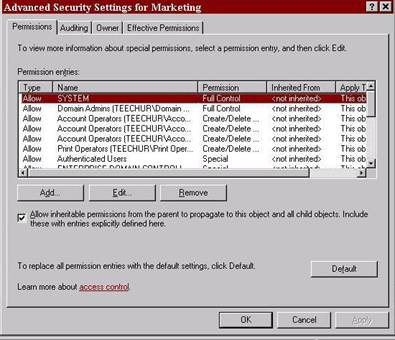
- Notice that some permissions are
inherited and others aren’t. By looking at the list of inherited
permissions, what would you assume DC= means?
- Double click on one of the listings.
Click the properties tab and use the scroll bar to view the permissions
associated with individual account properties.
- Look at the Apply onto dropdown list
to see all the different ways in which permissions can be applied to
objects and their properties. Almost makes your head spin, doesn’t it?
- You’re not doing to “do” anything
right now, but for the lab test you’ll need to show me how to access the
advanced security settings for an organizational unit.
Lab 6-12 Using the
Delegation of Control Wizard
Sometimes you want to
give another user responsibility over their organizational unit. For example,
you may not have the need to be fully aware of requirements for a specific
department. You might have IT people in different departments. You don’t have
time to manage the addition of every single user. You can delegate control so
that your IT staff can have control over different OUs. They can do as much or
as little as you need them to, alleviating you of the responsibility of taking
care of every single department.
- Open ADU&C and right click on
the Empire.
- Select Delegate Control.
- The Delegation of Control Wizard
starts.
- Click Next at the welcome screen.
- At the Users and Groups screen,
click Add. In the Enter the object names to the select text box type Galactic
Senate. Click OK. Click Next.
- You’ll see a list of things you can
delegate control over. List below the different things you can allow
control over.
|
Object |
Description |
|
Create, delete, and
manage user accounts |
|
|
Reset user passwords
and force password change at next logon |
|
|
Read all user
information |
|
|
Create, delete, and
manage groups |
|
|
Modify the membership
of groups |
|
|
|
|
|
|
|
|
|
|
|
|
|
|
|
|
|
|
|
|
|
|
- Notice that you can also create
custom tasks to delegate.
- At the Tasks to Delegate screen
click Reset user passwords…, and Create, delete, and manage user
accounts.
- Click next.
- Click finish! Now any of the Galactic Senate can add users and change passwords on users. They can’t do a lot of other tasks, but this would take some pressure off of you.
Extra Credit Unit Project
Module: Overview of Network Administration
|
Description
of Problem |
|
Spurlock Industries
consists of seven main departments; Marketing, Legal, Finance, Sales, Human
Resources, Management, and IT. The company currently has locations in |
|
Current Needs |
|
They would like you to
design a possible OU structure for Spurlock.com. They would like you to
rationalize the main decision in your organization.(Hint: Install Visio
2003 and use their Active Directory Structure template to do this.) |
|
Interviews with
employees |
|
CEO Currently we have
three servers set up at every site. We also have at least 150 workstations at
each site, with about 200 at the NYC site. We have a number of printers and
other resources shared throughout the domain. We would like to set this
network up on a relatively strict budget but with an eye towards expansion. User We have a pretty cool
network, but it seems to slow down during certain hours of the day. Some
users are claiming that the best time to work is lunch time. They have also
found that coming in on the weekends is better because less people are on the
network and it runs faster. One of the
networks in the Some users have
been caught coming in during off hours and using the fast connection for
their own use. The management is concerned that this might have some legal
aspects. IT
Departments As the network
implementation is underway we are finding that the connection between Replication
problems seem to be cropping up between NYC and Everett. We need some tools
we can use to troubleshoot this problem. The IT
department has a need to share a folder on the server in Human
Resources We need to have a
folder that we can share throughout the network so that all sites can access
it. I think the IT department knows what we need, but basically we have files
that everyone needs to get in and use. The managers need to see the files,
but not make changes to them. We don’t want them to mess them up! |
|
Expansion plans/Future
needs |
|
As the company gets
bigger the IT department has decided that it makes sense to eventually set up
a domain forest. Since they don’t have this capacity yet, they have asked you
if you would set up an OU structure along geographic boundaries. They are
planning on opening a research and development program in the new site ( They have asked that
you set this up and also set up a Universal IT group that can manage all of
the sites from one centralized location. You will need to create OUs, groups,
and users appropriate to their current and future needs. Since this is just a
lab, you’re not going to create all of the users, but do create one user who
is a member of the Marketing department in the OU you have set up in relation
to the |
|
Your Requirements |
|
Task One: Develop a
list of terms/jargon to be defined for the customer. Define the jargon. |
|
Task Two: Develop a
list of questions that must be answered before you can begin your research. |
|
Task Three: Develop a
list of current customer needs. |
|
Task Four: Develop a
list of future customer needs. |
|
Task Five: Research
solutions to the problems and develop a solution to present to the customer.
In this case include a drawing of the Wide Area Network and indicate on it
replication partners, speed, and OU setup at each site. |
|
Task Six: Keep a list
of resources consulted as you go. It will be part of your portfolio |
|
Task Seven: Create a
spreadsheet of prices to the solution, if applicable. |
|
Task Eight: Emulate
the solution on your system. |
|
Deliverables |
|
m
Jargon
list |
|
m
Questions |
|
m
Current
needs |
|
m
Future
needs |
|
m
Solution,
including graphics and drawings as necessary (WAN drawing) |
|
m
Resource
list |
|
m
Solution
set up on server, computers, etc. as appropriate |
Project Rubric
|
Criteria |
Out standing |
Good |
Needs Work |
Poor |
0 |
|
Definitions of
jargon/terms used in project |
20 |
14 |
6 |
4 |
0 |
|
Developed a list of
questions that should be answered before beginning. |
20 |
14 |
12 |
8 |
0 |
|
Customer current needs
identified. |
40 |
28 |
24 |
16 |
0 |
|
Customer future needs
identified |
40 |
28 |
24 |
16 |
0 |
|
Solution to problem is
clear and takes into account all aspects of customer needs. |
50 |
35 |
30 |
20 |
0 |
|
Solution is clear and
unique and is NOT copied and pasted from another website. Copying pasting
will result in a 0 grade on the project. |
50 |
35 |
30 |
20 |
0 |
|
Cost of solution is
priced out and includes information on vendors |
20 |
14 |
12 |
8 |
|
|
Solution is completely
emulated on team systems |
100 |
70 |
60 |
40 |
0 |
|
Entire team
participates in project |
20 |
14 |
12 |
8 |
0 |
|
List of resources used |
20 |
14 |
12 |
8 |
0 |
|
Project portfolio is
put together and is complete |
20 |
14 |
12 |
8 |
0 |
|
Total out of 400 |
|
||||